
Do you even need a presentation?
Most of the time, we shouldn't use presentations. If we are just conveying information, then a document is usually enough. If so an infodeck can be an effective layout technique. Recent developments make it easier to use web interactions to make a live document. Recorded video and audio allows the audience to watch and listen at their own time and pace. Live presentations are ideal for situations where you want to convey information while also interacting with people.
08 September 2026

Sumeet is the global head of culture and organisational design at Thoughtworks. In his past life, he was a software technologist for over two decades, working as a business analyst, product manager and transformation consultant.
This article is part of a series:
We often conflate presentations with the presentation file or the slideshow. That confusion leads to an undue focus on the slide deck and less focus on the presenter or the narrative. Here’s how I define the term “presentation”.
A presentation is an act of storytelling in which a presenter orchestrates narrative, timing, and emotion to create meaning that neither visuals nor documents can achieve on their own.
As a corollary to that definition, the slides are not the presentation. A presentation is a powerful tool for influence. You’ll get the most value from presentations when you reserve them for situations where they’ll be most impactful. At other times, you might be able to get away with conveying information using simpler or alternative methods.
Most of the time, a document is enough.
In most corporate scenarios, we’re just conveying information. Over the years, we’ve learned that visual content is easier to consume. Sometimes, using slideware well can make information more approachable, and I’ll address those cases shortly. Most of the time, though, slideware is a poor tool for well-structured writing. When we start using slides as a document format, we force readers to consume information in fragmented, disconnected bursts.
In contrast, a document that organises your ideas in a linear structure helps others build up their understanding as they read. By including diagrams where necessary, you can provide readers with a visual metaphor to encapsulate what you’ve written. When you use simple language, short paragraphs, headings, subheadings, bullets, and tables, you help time-poor colleagues scan your writing and grasp the essence of what you’re communicating.
The great advantage of using writing tools like Microsoft Word, Hemingway, or Grammarly is that you can codify the writing style you want to follow and the reading ease you aim for. Much like an IDE plugin assists a developer in writing code, these tools help you simplify your language so it's easier to understand.
Most writing tools include collaborative features to suggest changes, and that workflow makes it easier to improve the document to a point where it can stand alone as an independent, low-context artefact. Cutting, pasting, and reorganising text in a document is also far easier than doing so in slides. In cases where the content deserves hefty detail, you don’t spend hours trying to make things look pretty on a slide. Instead, you can simplify that detail for your readers.
Moreover, slide decks often leave things unsaid between slides, and when you communicate async, those gaps lead to misunderstandings and lost context. When you write, the linear structure of documents forces you to bridge different sections of your writing. From the reader’s perspective, even if they use an LLM to summarise your document, the explicit nature of linear writing reduces the likelihood of hallucinations.
So, in most corporate communication scenarios, a simple, linear document should suffice. There are some situations, though, where you may want to transfer this asynchronous content to a more visual medium.
Infodecks are the novice designer’s page layout solution.
Slide-based applications offer a ubiquitous page-layout interface for users unfamiliar with sophisticated desktop publishing. They support layer-based editing. Elements on top hide the elements below. What you see is what you get. Considerations like page size and margin width, which matter in print, don’t matter as much when you’re viewing an artefact on your computer. You can produce decent-looking ebooks without much specialised design skill. Take, for example, a trip memoir my son wrote, which I then laid out in PDF format using slideware.
In corporate settings, this ease of authoring translates to other documents — Martin Fowler calls them infodecks. Infodecks aren’t slideuments and don’t double as presentation devices. They’re only for what I’d call “light reading”. They juxtapose text with visuals and communicate information in a concise and approachable manner.
Martin’s website features several infodecks. My employer, Thoughtworks, has created a bunch of elegant and practical infodecks, too. Here are a few examples:
- Cloud economics playbook
- Digital government playbook
- Modern data engineering playbook
- Responsible tech playbook (UN version)
- Responsible tech playbook (business version)
In contrast to professional desktop publishing tools like InDesign or Affinity Publisher, software like PowerPoint, Keynote, Canva and even Google Slides offer an easier editing interface for most knowledge workers. But you don’t get this editing superpower for free.
- Authors must still write their content well — coherence matters. Effective infodecks don’t sacrifice ease of comprehension for brevity. As Mark Twain (or Blaise Pascal) famously said, “I’d have written a shorter letter, but I didn’t have the time.” Writing short, meaningful text is a skill that takes time to develop.
- Infodecks are most effective when the writing originates in a writing app that offers tools and plugins to help you write well, collaborate with your colleagues, and refine your message.
- Design makes an infodeck succeed or fail. The scarcity of design sense among knowledge workers is one reason most infodecks are ineffective. Indeed, the highest cost in producing infodecks comes from leveraging skilful information designers who can collaborate with subject matter experts to produce the final artefact.
Laying out infodecks in the ubiquitous slide interface can make concepts and ideas shine, and they could be worth the effort if you expect your content to have a long shelf life. But don’t underestimate the design effort behind these artefacts. Duarte Design offers a beautiful, if dated, guide to authoring what they call Slidedocs. “Slidedoc” is another name for an infodeck. Read the ebook, and you’ll learn several patterns you can implement in the slideware of your choice.
Use web interactions and applications to manage cognitive load
In the last year or so, we’ve seen an explosion of coding harnesses that allow non-developers to spin up simple applications. Using HTML, CSS, and JavaScript, you can embed content from external sources and use interactivity to manage your readers’ cognitive load.
Consider, for example, the word cloud below, which groups the company values of several IT, consulting, and design service providers. You can filter the values by clicking the company names, or hover over a specific value to see which companies have claimed it. You could provide this information through a document or a spreadsheet, but you’ll then rely on the user to manage their cognitive load.
Another example is this microcourse, which is based on a long-form article about how leaders shape cultural identity in groups and corporations. The content is almost identical to the original piece. Still, by chunking the concepts, adding interactions for the learner to explore, and including reflection questions to test their understanding, I’m managing their cognitive load.
These applications and interactions have their disadvantages too. Wiki pages and collaborative documents have built-in commenting functionality, so people can offer you feedback and reactions inline with your content. Adding this functionality to every app or interaction you build creates overhead. So, be aware of this trade-off. Interactive but stateless applications have limited utility beyond one-way information transfer.
If you can document your design direction and your underlying content is comprehensive enough, you can produce such simple content by leveraging a coding harness. Of course, there are complexities in how you host such content for your coworkers and in the shelf life of such applications. Since I’m not a software engineer, I estimate the shelf life of such applications based on how well I understand their inner workings.
When none of the above options is suitable, and you feel convinced the story needs your voice, that’s when you must consider a presentation. And even when you decide to present, a slide deck isn’t mandatory. Nor is it necessary to present live.
Recorded audio and video are a substitute for live presentations
The easiest foray into presentation territory doesn’t even need visuals. A well-written monologue, whether in audio or as a talking head, is sufficient to convey some ideas. You benefit from the richness of tone, the drama of pauses and pacing, and your unique voice. Ed Zitron, the critic-in-chief of the AI capex bubble, delivers regular monologues on YouTube without any visuals and still manages to have a cult following.
You can, of course, step up the production effort and add visuals to your voiceover. This is where slides can come into the picture. Modern presentation tools like Canva, PowerPoint, and Keynote help you create cinematic builds and transitions, so you don’t need high-end animation skills or a professional video editor to make a point.
There is a catch, though. When people watch a 30-frame-per-second video, they don't expect static slides on their screens. So, if your video only includes a voiceover and slides, you must cycle through builds and transitions much faster than when you are on screen. My video, which makes the case against brainstorming, is one such example. It’s 8 minutes long, with 129 builds and transitions to maintain the tempo of an online video, and, in hindsight, I’ll argue it’s slow.
On the other hand, my recorded presentations about cultural identity, where I appear on screen, span 141 builds and transitions over 24 minutes.
Either way, you might be aghast at the number of builds I’ve just told you about. And that’s the thing — there’s no formula for the right number of builds and transitions. Whatever helps you tell your story is what you need. No one counts the extra slides and extra transitions as long as your message shines.
Recording a talk forces you to be brief and cut the fluff from your narrative. Your audience can consume your content on their own time, slow it down, speed it up, or play it multiple times if they wish. Closed captions help others understand your accent, and chapter markers help viewers and listeners speed to or revisit topics of interest. With all these benefits, it’s fair to say that most presentations are better off as recordings.
So, when do you go live?
These days, live presentations come in two flavours: online and in-person. Either way, the purpose of a live presentation is to interact with people. At a conference, an impactful presentation could build your network and enhance your professional profile. At work, live presentations can serve as an event where you pitch to a client, educate colleagues, celebrate success, energise a community and use synchronous presence to influence your coworkers and field objections.
I suggest reserving live presentations for situations that merit the scheduling overhead. If you’re bringing people together in the same physical or virtual space to share something with them, it should be well worth everyone’s time.
And I recommend a high degree of prep for live presentations. People can’t speed you up or slow you down. Depending on the medium, there may be no closed captions to help people understand you. Pacing, articulation, preparation, and the synchrony between what you say and what you show are key to making a live presentation impactful.
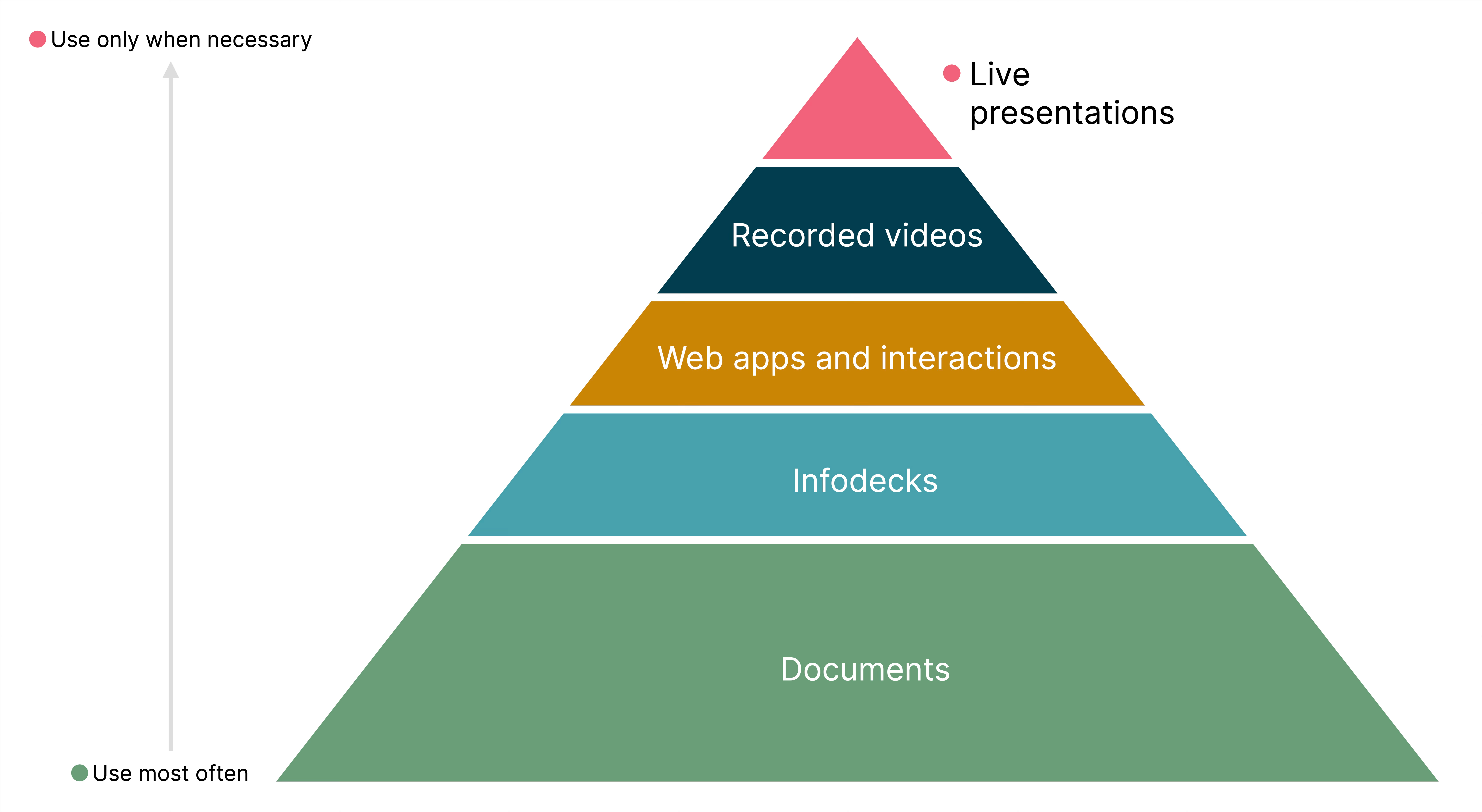
Figure 1: A hierarchy of communication approaches
With all the alternatives available to you, I urge you to consider whether you must present the information you want to convey. Perhaps the answer is yes. The narrowed-down choice then is between recorded, online, and in-person presentations. Those are the three interactions we’ll focus on over the remaining articles in the series. Next up, let’s discuss how to craft your story before you even touch any presentation tools.
Acknowledgments
Thanks to Anuroop Krishnan, Jade Daubney-Bennett, Raghvi Behl, Lubaina Rangwala, Gill Taylor, Santosh Mahale, and Gayathri Moghe for providing feedback for various development versions of this article. Martin Fowler helped me with an overall editorial review.
I have used Grammarly to proofread and copy-edit this essay. Claude helped me double-check whether I had addressed all feedback I’d received for this article, either as edits to the original or as ideas for future articles in this series.
Significant Revisions
08 September 2026: published