
Maintainability sensors for coding agents
In a recent article about harness engineering for coding agent users, I laid out a mental model for expanding a coding agent harness: a system of guides and sensors that increase the probability of good agent outputs and enable self-correction before issues reach human eyes. This article is a more practical follow-up where I walk through my experience with using sensors that help keep the codebase maintainable.
27 May 2026

Birgitta is a Distinguished Engineer and AI-assisted delivery expert at Thoughtworks. She has over 20 years of experience as a software developer, architect and technical leader.
There are multiple dimensions we usually want to achieve and monitor in our codebases: Functional correctness (works as intended), architectural fitness (is fast/secure/usable enough), and maintainability. I define maintainability here as making it easy and low risk to change the codebase over time - also known as “internal quality”. So I don't only want to be able to make changes quickly today, but also in the future. And I don't want to worry about introducing bugs or degradation of fitness every time I make a change - or have AI make a change. I usually see the first signs of cracks in the maintainability of an AI-generated codebase when the number of files changed for a small adjustment increases. Or when changes start breaking things that used to work.
Internal quality problems affect AI agents in similar ways that they affect human developers. An agent working in a tangled codebase might look in the wrong place for an existing implementation, create inconsistencies because it has not noticed a duplicate, or be forced to load more context than a task should require.
In this article, I describe my experimentation with various sensors that help us and AI reflect on the maintainability of a codebase, and what I learned from that.
The application
I'm working on an internal analytics dashboard for community managers that reads chat space activity, engagement, and demographic data from a combination of APIs and presents the data in a web frontend.
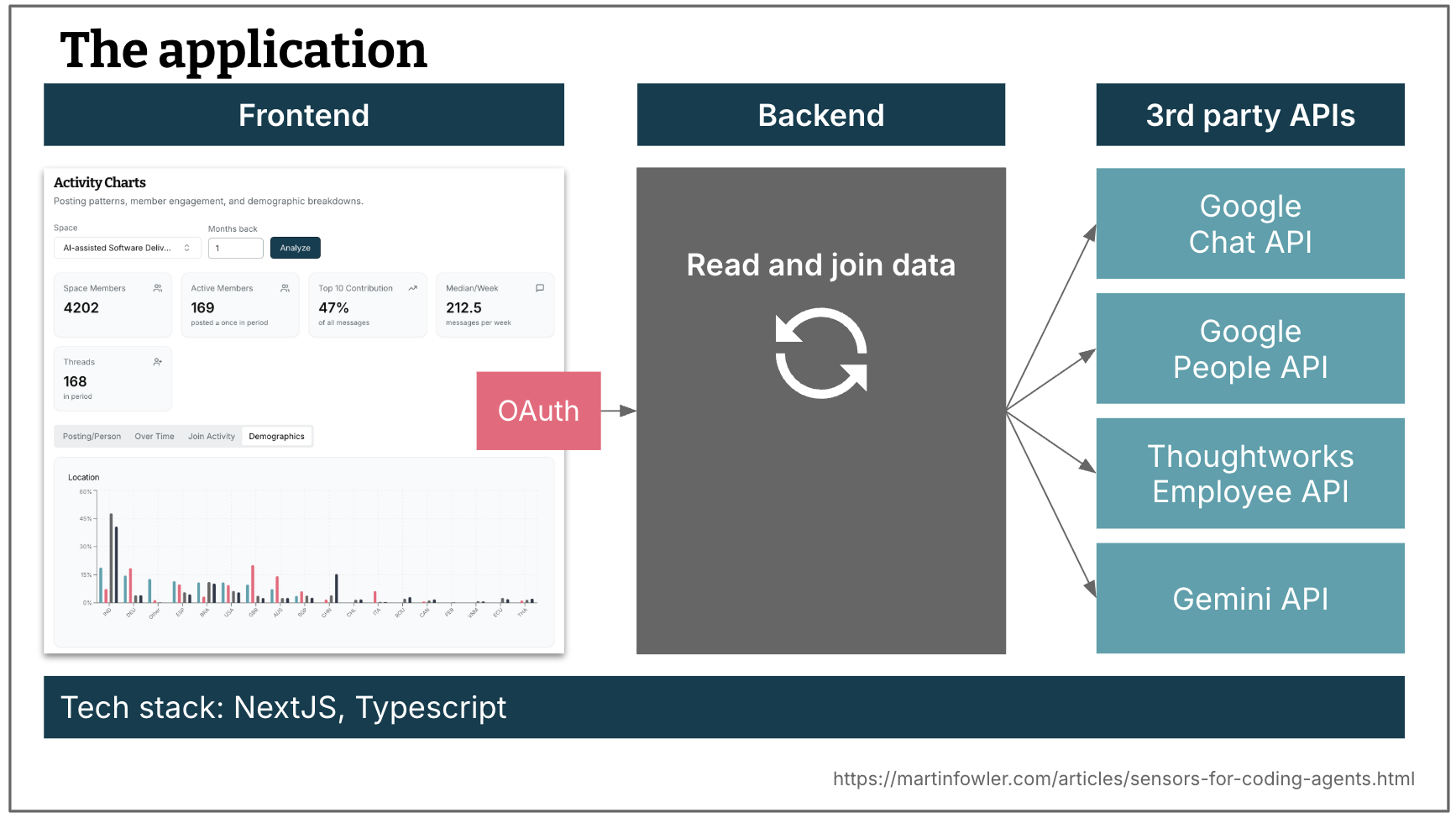
Figure 1: The example app: web UI, service layer, and external APIs.
The tech stack is a TypeScript, NextJS, and React. The backend reads and joins data from the APIs. The application has been around for a while, but for the sake of these experiments I rebuilt it with AI from scratch.
There are hardly any guides (e.g. markdown files) for AI about code quality and maintainability present, I wanted to see how well it can do just by relying on sensor feedback.
Overview of all sensors used
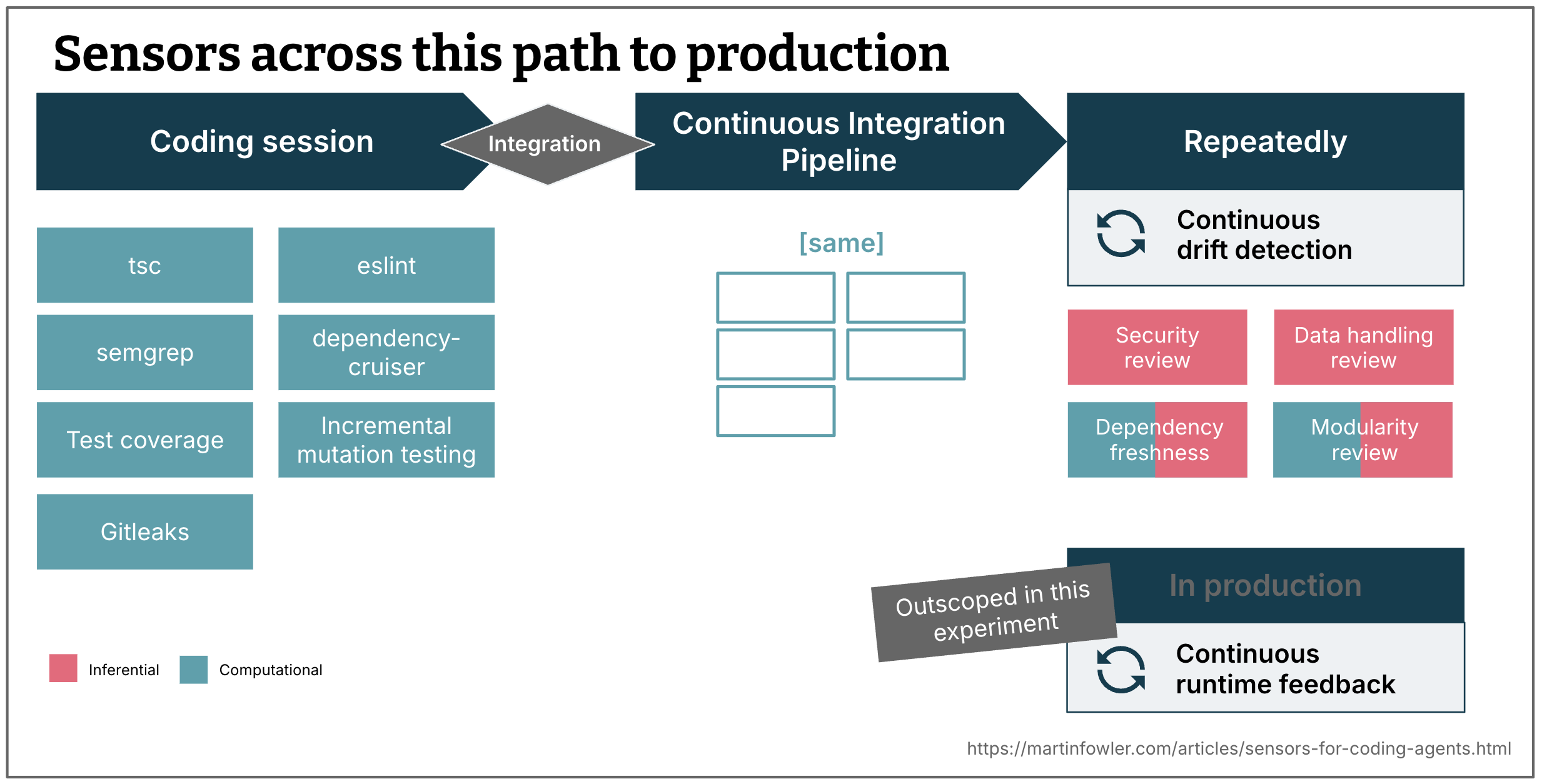
Figure 2: Where sensors can run: during the initial coding session, in the pipeline, on a schedule, and in production.
This is an overview of the sensors I set up across the path to production.
During coding session
Sensors that run continuously alongside the agent to provide fast feedback.
- Type checker (computational)
- ESLint (computational)
- Semgrep, SAST tool prescribed by our internal AppSec team (computational)
- dependency-cruiser, runs structural rules to check internal module dependencies (computational)
- Test suite results including test coverage (computational - though the test suite is generated by AI, therefore created in an inferential way)
- Incremental mutation testing (computational)
- GitLeaks runs as part of the pre-commit hook, I consider it to be a sensor as well, as it will give the agent feedback when it tries to commit (computational)
After integration - pipeline
The same computational sensors run again in CI. The in-session sensors give the agent early feedback during development. The CI pipeline confirms the result on clean infrastructure and after integration.
Repeatedly
Sensors that run on a slower cadence to detect drift that accumulates over time, rather than errors that occur in the moment.
- A security review, prompt derived from our AppSec checklist for internal applications (inferential)
- A data handling review, prompt describes things like “no user names should ever be sent to the web frontend” (inferential)
- Dependency freshness report, which runs a script first to get the age and activity of the library dependencies, and then has AI create a report with recommendations about potential upgrades, deprecations, etc (computational and inferential)
- Modularity and coupling review (computational and inferential)
With this context out of the way, let's dive into the first category of sensors.
Base harnesses and models
Throughout building the application, I used a mix of Cursor, Claude Code, and OpenCode (in that order of frequency). My default model was usually Claude Sonnet, for some of the planning and analysis tasks I used Claude Opus, and for implementation tasks I frequently used Cursor's composer-2 model.
Static code analysis: Basic linting
I'll start with my learnings from using ESLint in this application. Basic linting tools like ESLint mostly target maintainability risk at the level of individual files and functions.
Rules for typical AI shortcomings
In my experience, the AI failure modes that are the most low-hanging fruit for static code analysis are
- Max number of arguments for functions
- File length
- Function length
- Cyclomatic complexity
However, these weren't even active in ESLint's default preset, I had to configure maximums for them first. Hopefully, static analysis tools will evolve to provide better presets for usage with AI. A bit of research shows that people are also starting to publish ESLint plugins with rule sets that are specifically targeting known agent failure modes, like this one by Factory, with rules about things like requiring test files or structured logging.
Guidance for self-correction
A sensor is meant to give the agent feedback so that it can self-correct. Ideally, we want to give the agent extra context for that self-correction - a good kind of prompt injection. To do that, I built a custom ESLint formatter to override some of the default messages - with the help of AI of course, naturally.
Here is an example of my guidance for the no-explicit-any warning.
We want things to be typed to make it easier to avoid errors, especially for key concepts.
But we also want to avoid cluttering our codebase with unnecessary types. Make a judgment
call about this. If you choose to not introduce a type, suppress it with:
// eslint-disable-next-line @typescript-eslint/no-explicit-any -- (give reason why)`,
Managing warnings - now more feasible?
Static code analysis has been around for a long time, and yet, teams often didn't use it consistently, even when they had it set up. One of the reasons for that is the management overhead that comes with it. Effective use of this analysis requires a team to keep a “clean house”, otherwise the metrics just become noise. In particular warnings like the no-explicit-any example above are tricky, because you don't always want to fix them - it depends. And suppressing them one by one has always felt tedious, and like noise in the code.
With coding agents, we might now have a chance at that clean baseline. In the guidance text above, the agent is told to make a judgment call, and allowed to suppress a warning in the code. This keeps the suppressions manageable, visible and reviewable.
For thresholds, like the maximum number of lines, or the maximum allowed cyclomatic complexity, I told the agent in the lint message that it may slightly increase the thresholds if it thinks that a refactoring is unnecessary or impossible in a particular case. This doesn't suppress the threshold forever, just increases it, so that the rule fires again if it gets even worse in the future. Constraints are preserved without forcing a binary suppress-or-comply choice.
Observations
- Looking at the exceptions AI created (suppressed warnings, increased thresholds) was a good point to start my code review.
- AI frequently decided to increase the cyclomatic complexity threshold, but suggested good refactorings when I nudged it further. It was the only category where it did that, and I later discovered that I didn't have a self-correction guidance in place for this one, so there was no explicit instruction saying that a threshold increase should be the absolute exception. This is an indicator that the custom lint messages can indeed make quite a difference.
- Sometimes I want to treat rules differently in different parts of the code. Let's take
no-console, telling AI off when it usesconsole.log. In the backend, I want it to use a logger component instead. In the frontend, I might want to not use direct logging at all, or at the very least I need to use a different logging component. This is another example of the power of the self-correction guidance, and where AI can help with semantic judgment and management of analysis warnings. - I was watching out for examples of trade-offs between rules. The only one I've seen so far was created by the
max-linesandmax-lines-per-functionrules. I've seen AI do quite a bit of useful refactoring and breakdown into smaller functions and components as a result of this sensor feedback. However, in the React frontend, I'm seeing a worrying trend of components with lots and lots of properties as a result of passing values through a growing chain of smaller and smaller components. I haven't got useful observations yet about how good AI might be at making consistent decisions between tradeoffs like that.
Main takeaways
Overall, I was positively surprised by how many things I can cover with static analysis. I had to remind myself multiple times why it has been somewhat underused in the past, and what has changed: The cost-benefit balance. Cost is reduced because it's much cheaper to create custom scripts and rules with AI. And the benefit has also increased: the analysis results help me get a first sense of lots of hygiene factors that wouldn't even happen that much when I write code myself, so I can get common AI mistakes out of the way.
However, I can't help but wonder if this can also lead to a false sense of security and an illusion of quality. After all, another reason why linters like this have been less used in the past is that they have limits, and we have been wary of using them as a simplified indicator of quality. There are lots of more semantic aspects of quality that static analysis cannot catch, it remains to be seen if AI can adequately fill that gap in partnership with those tools. I also discovered new supposed issues in the code every time I activated a new set of rules. It was always a mix of irrelevant things and things that actually matter. So I worry about feedback overload for the agent, sending it into a spiral of over-engineered refactorings.
Static code analysis: Dependency rules
Basic linting is mostly focussed on quality and complexity within a file or function. Next I started looking into sensors that could give me and the agent feedback about maintainability concerns that cross file and module boundaries. Analysis tools in this area are historically even more underused than the basic linting.
To learn about the potential of sensors that can help us and AI keep up good modularity inside of a codebase, I explored three things:
- Dependency rules (deterministic)
- Coupling analysis (deterministic and inferential)
- Modularity review (inferential)
Let's start with dependency rules. I worked with the agent to come up with a layered module structure for my application, about half way through implementing it. I asked it to help me write dependency-cruiser rules to enforce these layers.
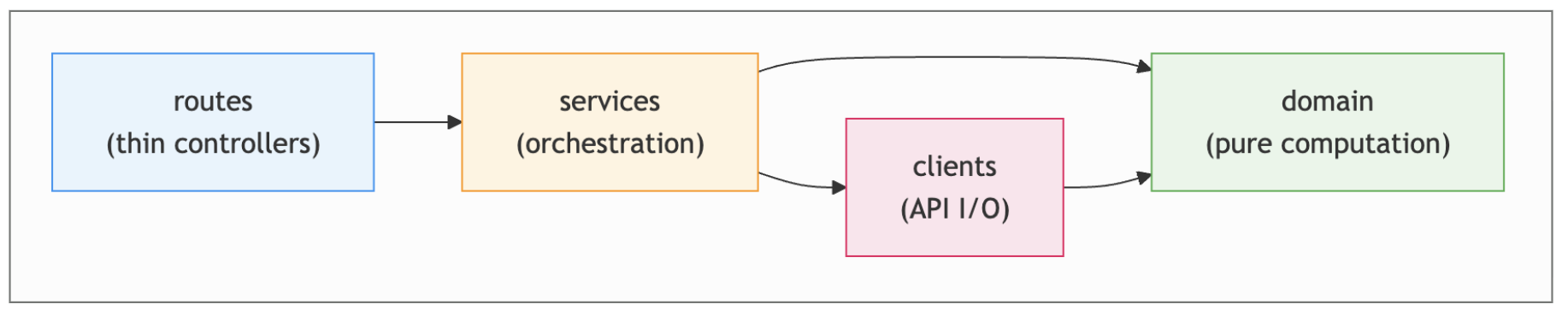
Figure 3: Layered module structure and dependency rules
For example, one of the rules enforces that code in the clients folder never imports anything from the services folder:
{
  name: “clients-no-services”,
  comment:
    “API clients must not depend on the orchestration layer above them. “ + LAYERS,
  severity: “error”,
  from: { path: “^server/clients/”, pathNot: “/__tests__/” },
  to: { path: “^server/services/” },
},
As with the ESLint messages, I also expanded the error messages a bit to be self-correction guidance, recapping the layering concept as a whole:
ERROR  clients-no-services
  API clients must not depend on the orchestration layer above them.
  [Layers: routes -> services -> clients + domain; Services orchestrate: fetch data via clients, compute via domain -- no I/O, no SDKs, no knowledge of data fetching.]
Observations
- Without AI, I would not have gotten these rules in place quickly. The tool's configuration syntax has a steep entry cost, and AI absorbed that cost almost entirely.
- The agent violated the rules a handful of times after I introduced them, and then self-corrected based on
dependency-cruiserfeedback, so it did help keep my folder concepts. - I also used the same approach to introduce conventions for how React hooks should be structured in the frontend.
- I had to figure out how to catch things when AI starts creating new folders outside of this structure, with a rule that requires every new file to be somewhere in the predefined folder structure.
Main takeaways
At the point when I introduced these rules, the structuring of code into folders had already become a little bit haphazard. I could see how the rules helped the agent clean that up, and then continue enforce these layers going forward. So I've found it quite a useful replacement for describing code structure in a markdown guide. However, tools like this are limited to what is expressible via imports, file names, and folder structure.
Static code analysis: Coupling data
Next, I experimented with the extraction of typical coupling metrics from my codebase, i.e. the number of incoming and outgoing imports and calls per file.
I didn't use any existing tools for this, instead I had a coding agent write an application that creates those metrics with the help of the typescript compiler, so that I could have maximum flexibility to play around with this as part of my experimentation. I had it add two interfaces: A web interface with a bunch of different visualisations of those metrics for my own human consumption. And a CLI that can provide those metrics to a coding agent.
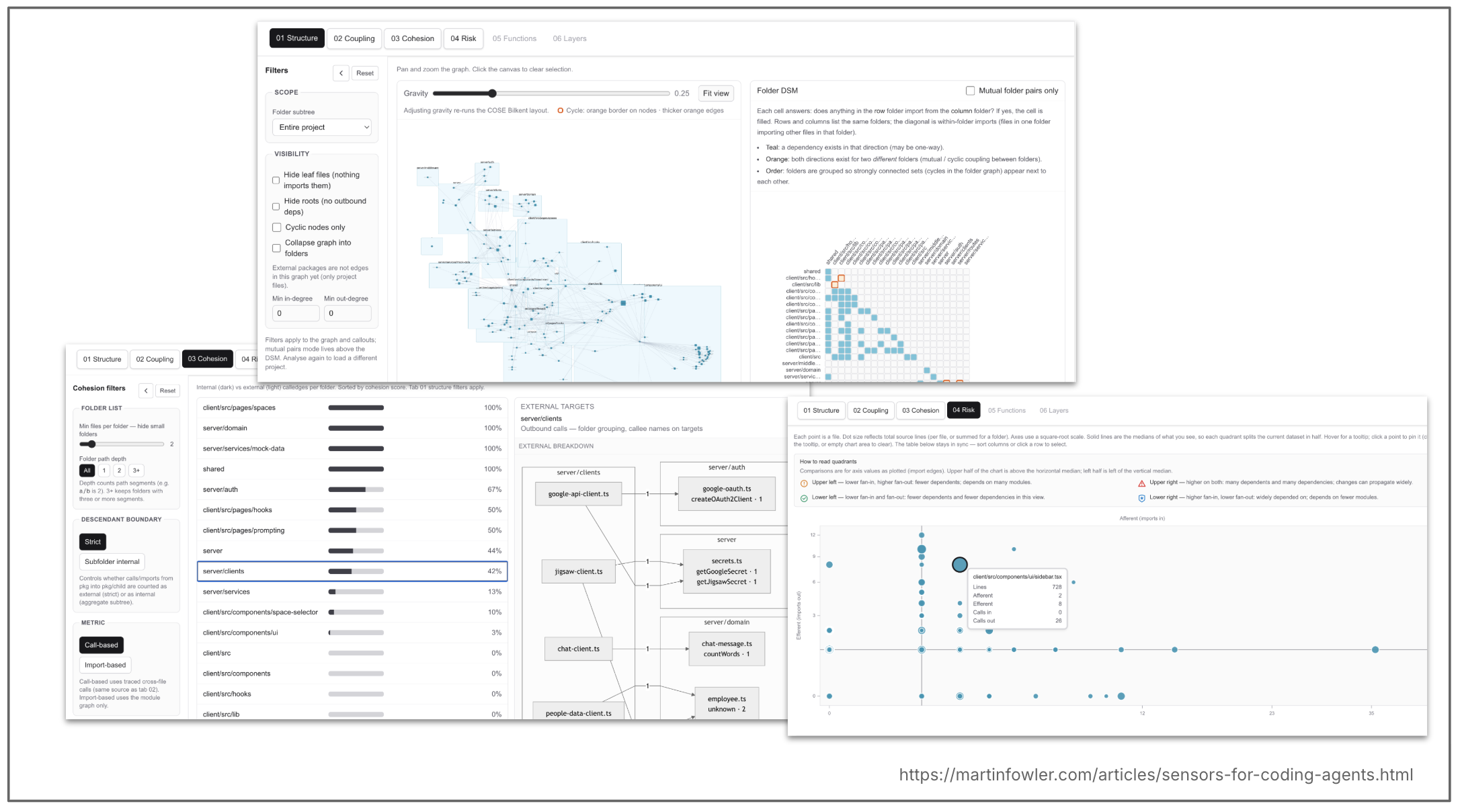
Figure 4: Coupling metrics: web visualisations and CLI for agents.
For human consumption
Most of these visualisations are well established concepts, like a dependency structure matrix (DSM). I found them tedious to interpret, and even though they were vibe coded and could most certainly be improved, I think that had more to do with the nature of the data. It's quite detailed data that needs a lot of context and experience to interpret it, and map it back to more high level good practices. So I have a feeling that these types of tools still won't really help reduce a human's cognitive load much when reviewing codebases that were changed by AI.
For AI consumption
I gave an agent access to this custom CLI (coupling-analyser) and asked it to create a report based on the data, including suggestions of how to improve the critical issues.
Here is an excerpt of what that prompt looked like - I'm mainly reproducing this to show you that I didn't actually give it much guidance on what good or bad modularity looks like, I mostly delegated to the model to interpret what good and bad looks like:
Produce a markdown report on modularity and coupling quality for the target TypeScript codebase, grounded in actual CLI output from npx coupling-analyser, not guesswork from static browsing alone.
Gather evidence (run the CLI)
Execute the CLI and capture stdout. Use the report subcommands—combine as useful for the question:
…
Write the markdown report
Use clear headings. Prefer concrete module IDs / paths and numbers quoted or paraphrased from CLI output.
Suggested sections:
-
Context — What was analyzed
-
Executive summary — 2–5 bullets: overall modularity posture, top 1–3 systemic issues.
-
Findings from the tool — Summarize hotspots, top risks, notable cycles or mutual dependencies, and behavioural highlights as reported by the CLI.
-
Interpretation (modularity lens) — Tie metrics to software design: cohesion vs. spread of change, stability vs. dependency direction, fan-in/fan-out intuition, cycle impact.
-
Deep dives for each high and critical issue
- What it is — Module(s), role in the system, dependency neighbours (from CLI + minimal code peek if needed).
- Responsibilities today …
- Why it hurts …
- Design options (2+ where reasonable) …
- Why the new design is better — Fewer cycles, clearer dependency direction, smaller surfaces, test seams, align with likely change vectors.
- Future change risk — How each option reduces regression risk and makes safe evolution cheaper (concrete scenarios: “adding X”, “swapping Y”, “shipping Z independently”).
…
This LLM-led analysis actually pointed me to the same coupling hot spots that I would have found by looking through the visual diagrams, just in a format that was more digestible. And asking the LLM to ground its analysis in the results from the deterministic tool gave me a higher level of confidence, and probably also used less time and tokens than if the agent had scanned the codebase itself to find coupling problems.
Observations
What the LLM found based on this data was quite lackluster (I used Claude Opus 4.7 for this):
- It said one of the biggest issues was a factory that initialises all the necessary components, but I had introduced that factory on purpose as a component that acts like a lightweight dependency injection framework.
- Another issue it had was with a shared (
zod) schema between frontend and backend, declared a “god module” by the LLM. This is a common pattern though to create an explicit contract between backend and frontend, and is not as much of an issue when backend and frontend evolve together anyway, or even live together in the same repo, like in my case. - When legitimate patterns appear as high-coupling hubs, there would have to be a way to suppress those in future analyses, otherwise they create even more noise.
- The one kind of interesting finding it had: An
index.tsfile in the domain folder indiscriminately exposed all files in./domain, and is imported by lots of places. While that is also a common pattern to create explicit contracts for a layer, it does have its pros and cons, and is at least worth an investigation to see if it is appropriate for this codebase.
Main takeaways
The examples above show that even more so than with the basic linting, good and bad does not have a clear definition, instead it is all about what is appropriate. And what coupling is appropriate depends on a lot of context, not just the raw call and import graph of a codebase. So based on this small experiment, I don't have the impression that this type of coupling data is useful to AI on its own.
A more practical use I can imagine for this data is during risk triage for code review. When I review a code change made by AI, it seems useful to know what the impact radius of the changed files is, so that I can pay more attention when e.g. a file with 10+ callers is changed. Or an AI review agent could use the data to prioritise where it spends its tokens.
Static code analysis: AI modularity review
The lackluster results from the coupling data experiment could have multiple reasons:
- My prompt about what to analyse was not very specific
- The coupling data is not useful to AI
- The coupling data only is too shallow and lacks context of the full code
So the final thing I did was to go fully down the inferential route and use Vlad Khononov's “Modularity Skills” to analyse the codebase design and find modularity issues. This proved to be very fruitful! It gave me lots of interesting pointers for refactorings that would obviously reduce the risk of future changes. I ran the skills a second time and gave them access to my coupling analysis CLI. The AI mostly found confirmation in the data, but not any additional findings. On the contrary, it pointed out lots of things that the CLI was missing. It's also worth noting that the second run of the analysis (without context of the first one) surfaced yet another issue that the first run did not find. A useful reminder that when it matters, it's often worth running an LLM-based analysis multiple times, to get a fuller picture.
Observations
Here are some highlights from the results (model used was Claude Opus 4.7, same as for the coupling analysis):
- Duplicate route code - all my three backend endpoints had their own route file, and each of those route implementations was almost identical. So whenever I would want to introduce a change to the general principles of the backend API (let's say introducing a request ID, or changing the error handling or logging approach), I'd have to do it in multiple files. I had only just introduced a third endpoint, so I think it's fair enough that this wasn't abstracted out yet. But in my experience, AI agents usually don't go ahead and start refactoring without an explicit nudge when they repeat a piece of code for the third or fourth time, they are quite happy to copy and paste.
- Inconsistency in calling the backend - or put another way, yet another form of semantic duplication. I have 3 pages in the application that need to call the backend with the same set of parameters (selected chat space, and which date range to analyse). Two of those pages were using the same hook and general approach to do this, but when AI introduced the third page, it deviated from that and reimplemented similar behaviour in its own way. This can e.g. lead to inconsistencies in error handling, or again the need to change multiple files when backend API principles change.
- Inefficient handling of the core arguments - As just mentioned, all the pages in the application pass on a chat space ID and a date range to the backend. I had already noticed when I changed the way a user can specify a date range that AI had to change a lot of files for that change - over 40! So I was already aware that something was fishy here, and the analysis confirmed it: “Issue: Request parameters repeated at every level”. The recommendation was to introduce an object that wraps all of these parameters. AI had already done that in a way - but never fully followed through with the usage of that object, so it was an inconsistent mess.
- Responsibilities in the wrong place - The review found a bit of authentication code sitting inside our factory that was supposed to only be responsible for wiring up our modules. It implemented a fallback to mock data when the user is not authenticated. An unexpected location like that creates a risk of being missed when new routes are added.
- Better interpretation of acceptable high-import-count “hubs” - Remember the “god classes” found by my previous coupling analysis? The modularity skills also noticed these, but in both cases nicely pointed out that they have a purpose in the context of this application. I assume that is either due to the good prompting in these skills, or due to the fact that this analysis actually read what was in the code, whereas I asked the other one to only rely on the coupling data.
Main takeaways
- Dependency parsers like
dependency-cruisercan be effective live sensors to enforce some basic folder structures and dependency directions, but they can only go so far. - The AI modularity review is a great example of “garbage collection”, and worked quite well when given powerful prompts. Grounding it in actual coupling data didn't seem to make much difference. It would be great to find a way to apply this to the changed files in a commit, to have this earlier in the pipeline, but I did not explore this yet.
- I ran the modularity review after building most of the codebase without applying that type of review myself - and it had some quite concerning and very valid findings that would have increased risk in the future. It shows that without human review and coupling expertise, AND without these extra AI reviews, the agent was definitely compounding inadvertent technical debt.
Overall, codebase design and modularity seems like a concern where computational sensors alone cannot help us much, AI is needed to add semantic interpretation, and consider trade-offs.
The test suite as a regression sensor
Tests have many purposes — they help us think about and drive our design, they document the wanted behaviour of the application (they are the ultimate specification!), and they help us detect regressions, i.e. they tell us when we break pre-existing functionality with a change. Effective regression tests play a big role in the maintainability of a codebase, they make it much safer to change it. So in the context of maintainability sensors, this section is about the test suite's role as a regression sensor.
When a pre-existing test fails, we have to ask ourselves a question: “Did I break something accidentally, so I need to change my implementation? Or am I changing the behaviour intentionally, so the tests have to change to adapt to this new specification?” A failing test gives AI the opportunity to ask that very question. It might not always take the right decision, mind you! But a good test suite decreases the probability that AI breaks wanted pre-existing behaviour.
In my chat analytics application, I had the agent write all the tests over time without much oversight other than manual testing and keeping an eye on the test coverage. I wanted to have a full AI-generated test suite to analyse its regression effectiveness in hindsight.
There are two main risks with the approach of AI generating tests without review:
- Coverage is not a sufficient indicator of test effectiveness
- The tests might be testing faulty behaviour — this is a much more difficult problem than checking test effectiveness, and one for another time. This article focusses on test effectiveness only, i.e. assuming that our code implements the wanted behaviour, do we have tests that catch breaking code.
What is in our toolbox?
- Coverage ($) — tracks which parts of the code are executed by tests, giving an indication of which parts of the code are visible and invisible to tests.
- Property-based testing ($) — can find missing logical test cases, by generating many input combinations from defined properties rather than hand-crafting examples.
- Fuzz testing ($$) — can find missing test cases for input resilience, by throwing unexpected or malformed inputs at the system.
- Mutation testing ($$) — can find missing assertions, by introducing small code mutations and checking whether the test suite catches them.
In my application, I used coverage and mutation testing, as property-based testing and fuzz testing weren't as suitable to my use case.
Mutation testing
Here is a small example from my codebase to illustrate how mutation testing can help us find gaps in assertions. The agent created this diagram for me during the analysis of mutation testing results:
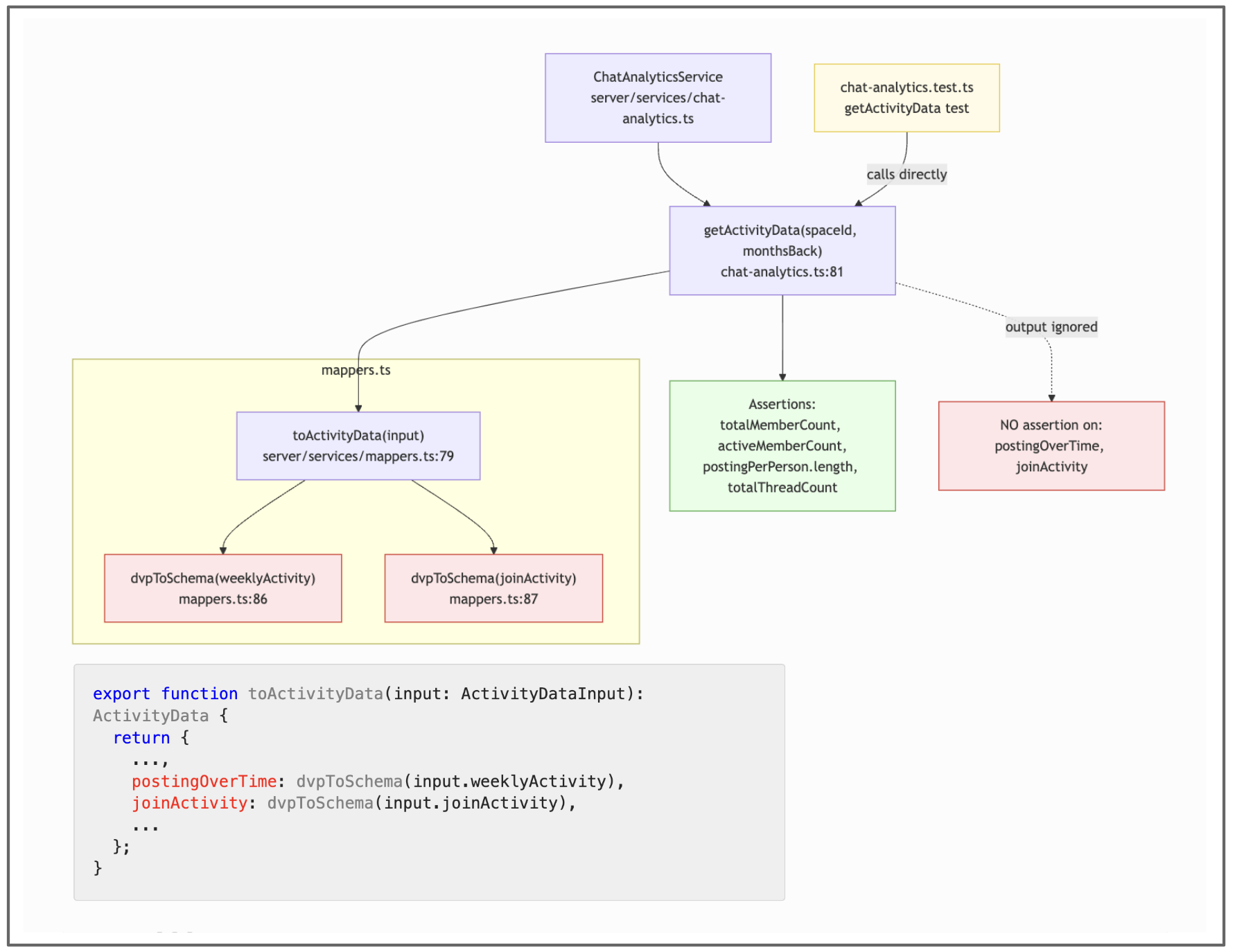
Figure 5: Mutation testing example from the codebase.
The mappers.ts file reported 100% statement coverage and 75% branch coverage — but it turned out to have no unit tests, and Stryker (the mutation testing tool I used) reported 13 survivors (i.e. after 13 of Stryker's code mutations the test suite was still green). The coverage in this case was high because the codebase has a big acceptance test that ultimately called these functions — coverage tells us that a line was executed, but not that its impact was verified. If this little mappers helper function dvpToSchema would be changed in the future, it could potentially break the display of a data graph in the UI.
Observations
- AI was very helpful in analysing the mutation hot spots and making a prioritised plan where to increase test quality.
- Stryker writes results to a huge JSON file. To help with analysis and avoid accidentally clogging the context window, I generated a custom script to help the agent query Stryker's results efficiently. That is just one of many examples where AI helped me help AI.
"""Query a Stryker mutation-testing JSON report from the command line.

Usage:
python query_stryker.py <report.json>; <command> [options]

Commands:
   summary Overall status totals, mutation scores, thresholds.
   files Per-file breakdown, default sorted by mutation score asc.
   hotspots Lines with the most survivors / no-coverage mutants.
   tests Test effectiveness: weak, unused, or top-killer tests.

Examples

# 1. Overall health — mutation score, status breakdown, threshold pass/fail
python ./query_stryker.py reports/mutation/mutation.json summary

# 2. Worst files first, with an action hint (strengthen assertions vs add tests)
python ./query_stryker.py reports/mutation/mutation.json files --top 10 -v

# 3. Same, but only for files you've changed in git (auto-detects the repo)
python ./query_stryker.py reports/mutation/mutation.json files --changed -v

# 4. Zoom into one file: every (line, actionable counts, sample mutators)
python ./query_stryker.py reports/mutation/mutation.json hotspots --file server/services/ai-summaries.ts --top 30

"""
Main takeaways
There currently seems to be a trend towards more end-to-end style acceptance tests. As mentioned in the beginning, AI has gotten really good at generating tests, so it has become quite normal for developers to just let AI generate lots of tests, without much review. Reviewing unit tests in particular can be very tedious. I'm not saying it's a good thing not to look at them at all — but I acknowledge the reality that it is unrealistic to think that human review of all tests is sustainable, and it's unrealistic to think that people will actually do it. So while we search for the appropriate testing pyramid/ice cream cone/muffin shape of the AI coding future, techniques like approved scenarios are becoming popular. As demonstrated above, acceptance tests increase coverage, but are often not very assertion-heavy, giving us a false sense of security in test effectiveness — mutation testing helps us monitor that gap.
Mutation testing has a practical limitation of course: It is quite resource intensive. In my setup I didn't run it continuously (like some of my other sensors), but triggered incremental runs manually.
Conclusions and open questions
Computational sensors impressed me most at the file and function level. Cross-file concerns like modularity and coupling were a different story, the raw data itself was very noisy and not that useful without semantic interpretation of an LLM, i.e. an inferential sensor. But I was very impressed by the outputs and advice I could get from that with a good prompt, and also by the potential to present this information in different ways, for different experience levels.
What I haven't seen in my experiments, but suspect can become more of an issue, is conflicts between sensors. The max-lines and max-lines-per-function rules showed some signs of tension, the refactorings to smaller and smaller functions pushed complexity into component property chains instead. More trade-offs like that are probably lurking, and it will be interesting to see over time if and how that becomes a problem.
I did not bother with guides at all in this application, for the sake of seeing the effect of the sensors more purely. I'm curious about how the balancing of guides and sensors will evolve. Once we feel confident in a set of sensors, what guides can we delete? Do sensors make the use of weaker models more realistic? How do we keep guides and sensors consistent with each other, and will we find ways to bundle them together somehow, to make them easier to maintain?
In the regression testing area, my eyes have really been opened to how crucial mutation testing becomes when we make the decision to leave most of the testing to AI... And I want to stress once more that there is a whole other conversation to be had about correctness of tests!
While some of these sensors really do increase my trust into the quality of the outcomes, they are not a magical solution to take the human totally out of the loop. But I definitely experienced an improvement in my review experience and trust level with both computational and inferential sensors as my partners.
Acknowledgements
Thanks to Chris Ford and Matteo Vaccari in particular for the conversations about sensors, and all my colleagues at Thoughtworks who engaged with this topic and gave me feedback and ideas.
GenAI was used for research and polishing the language.
Appendix: About tooling
How did I do this practically then, how did I provide this sensor data to the agent? In all of the experiments described, I used a vibe-coded little “sidecar” application that could run all of my computational sensors. It's not a fully realised tool and I made some compromises for simplicity, but it helped me explore and speculate about what good tooling for this might look like.
The sidecar is a CLI that can read a config file describing all sensor commands, and then run them continuously, in intervals. This is somewhat inspired by how we run test suites in watch mode while we're typing code.
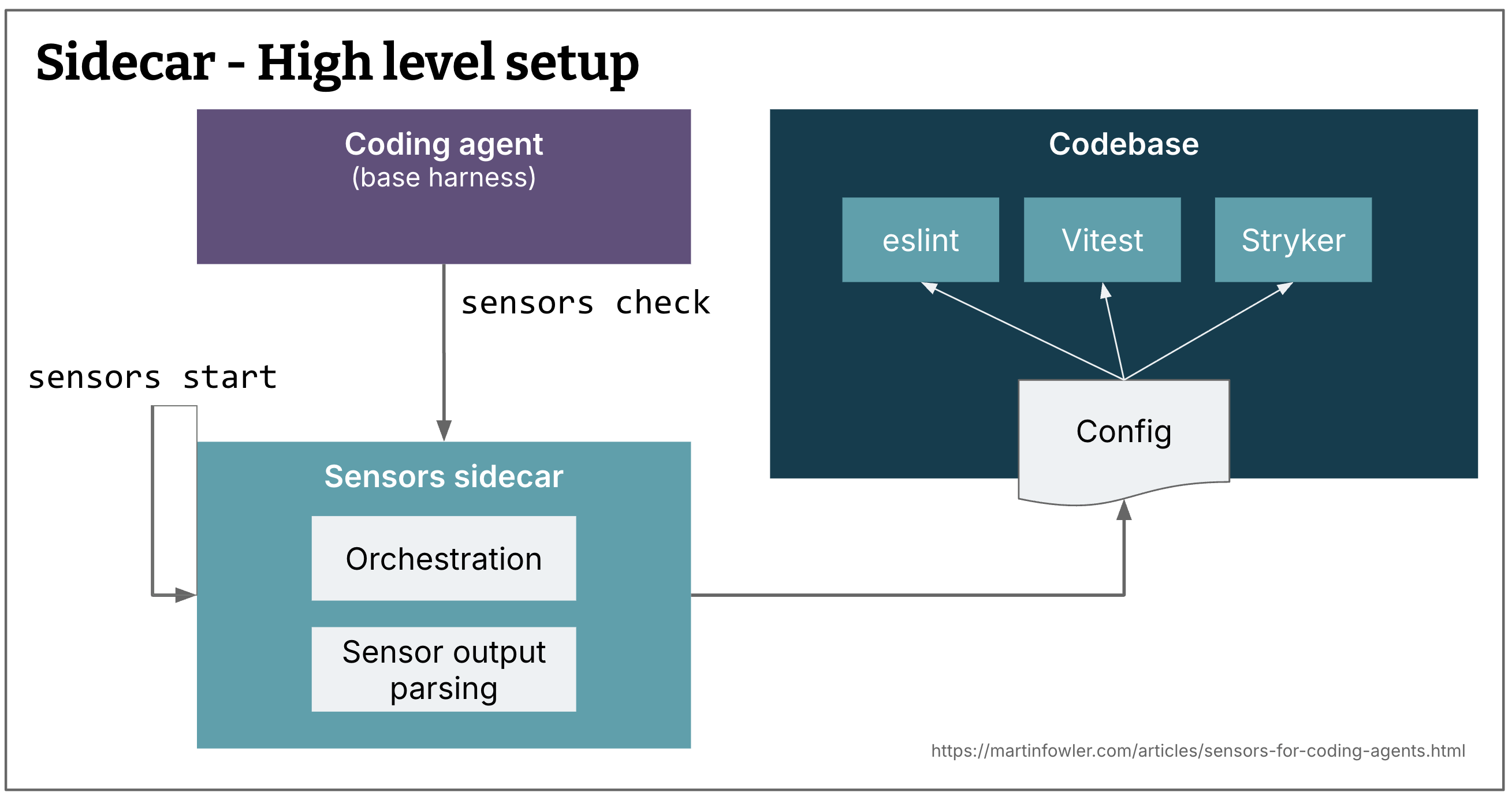
Figure 6: Overview of the sidecar setup
The CLI can offer both situational awareness for the human in supervised sessions, and a token-efficient and guidance-enriched summary to the agent.
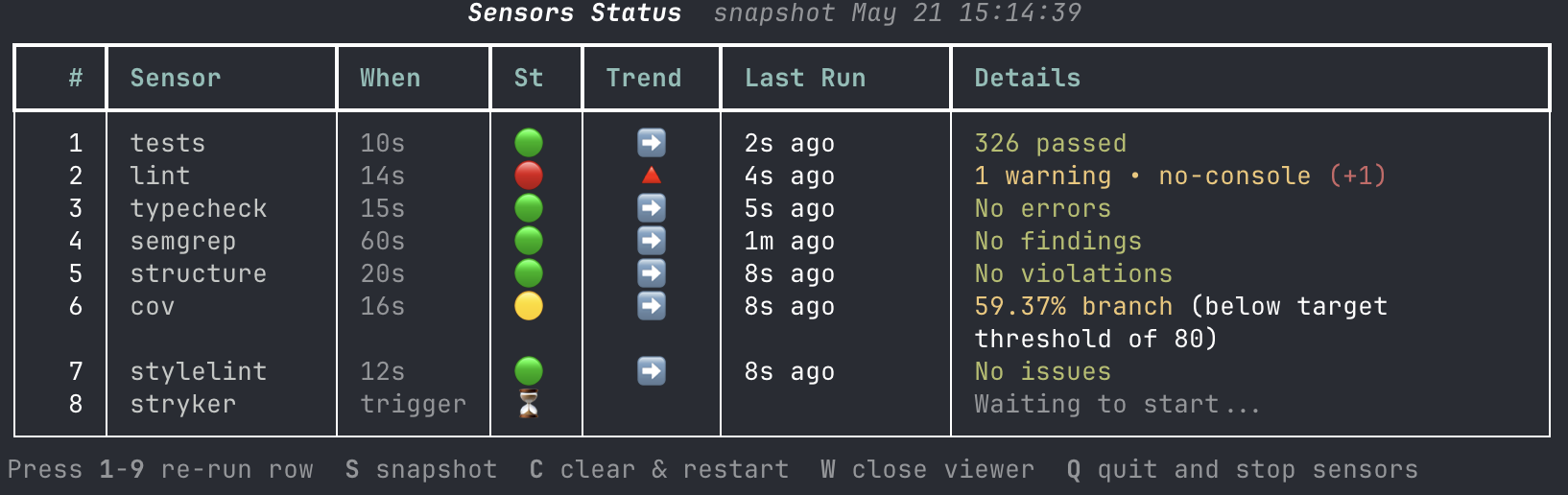
Figure 7: Visual overview of sensor status
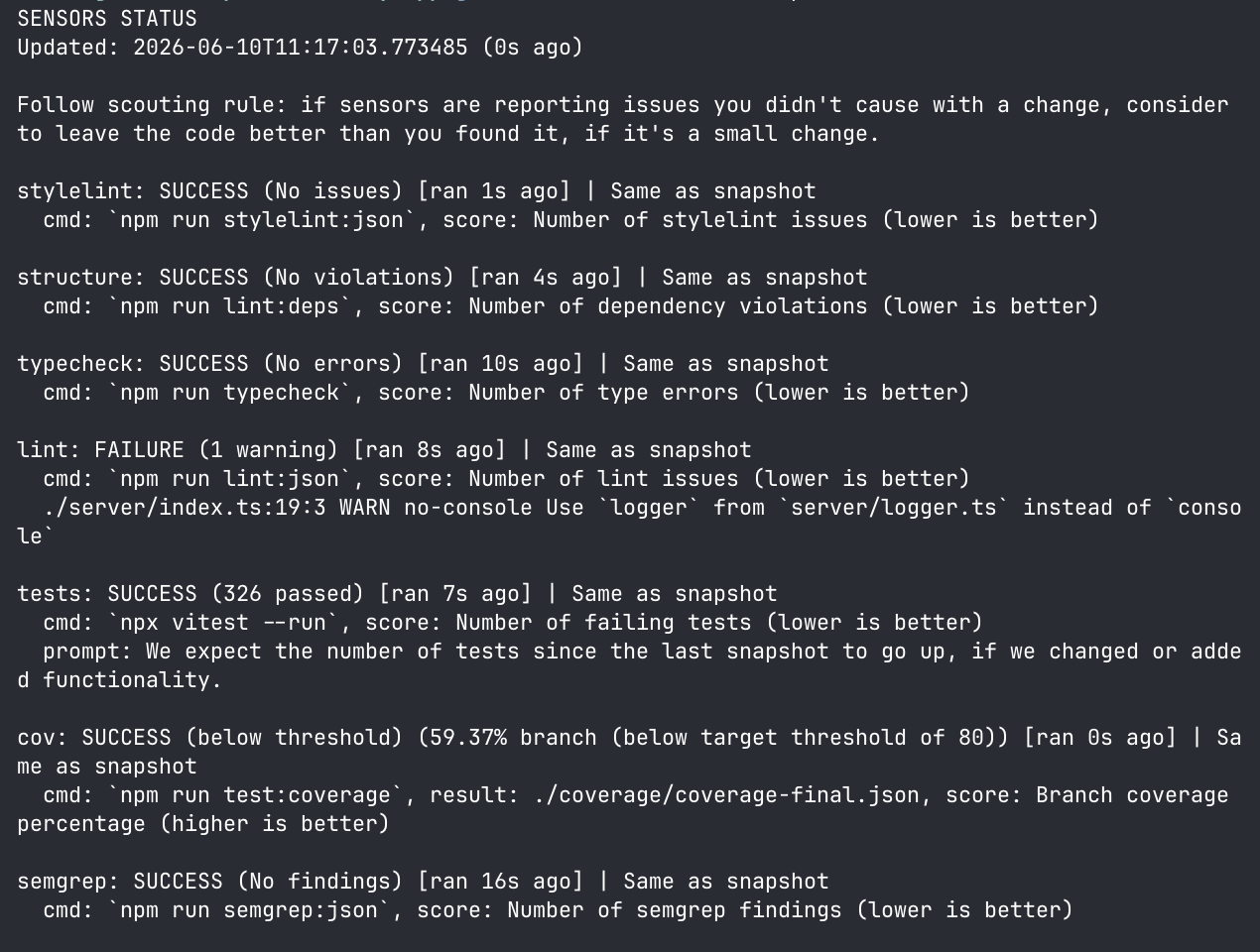
Figure 8: Summary the agent gets when it checks for the status
A few things to note in the agent summary:
- “Follow scouting rule: ...” - this addition at the top is an example of a global guidance prompt I configured in the sensors config file.
- “Worse than / Same as snapshot” - The CLI has the ability to persist a snapshot to communicate trends to the agent.
- “higher / lower is better” - A description of what the score here is, and what direction is wanted. This might be a bit overkill though, as most models' training data should be well aware that low number of test failures is good, and high number for coverage is good.
- “(below target threshold of...)” - For some sensors, it needs to be defined what good looks like, it's not always 0 or 100.
This example illustrates the opportunity we have in a setup like this to provide much more guidance for the self-correction than when we use the tools out of the box. And the agent summary could of course be minimised even more and only include information on things that have failed, similar to an “evergreen” type of CI monitor.
Integration with the coding harness
How to get the agent to check the sensor status regularly? There are multiple options for this.
- Via a guide - A skill, or a section in AGENTS.md that asks the agent to check the sensors regularly. This is the easiest way, and this is what I mostly did. But, it is also quite unreliable. I had to ask the agents many, many times why it had not run the sensors check a single time, or why it was running tests or linters directly instead of checking the sensors.
- Via hooks - I imagine there's a way to force this more regularly with hooks, but it needs some consideration which hooks to use. After every file edit is probably a good starting point, but it would have to be monitored if it's too much distraction for the agent.
- Via git hooks - For users who like their agents to do frequent small commits, a
pre-commithook can be a good way to force a sensors check to take place before code even gets into a commit. - Custom extension - I wondered if providing the harness with a custom tool that does the check makes it more reliable. I tried this by building an extension for (and with) Pi. It seems quite promising, and I could easily do things like asking the user on startup if they want to start and snapshot a sensors session. But at the time of writing this, I haven't used the extension enough to tell if it's running more frequently than it would with an instruction in some markdown file.
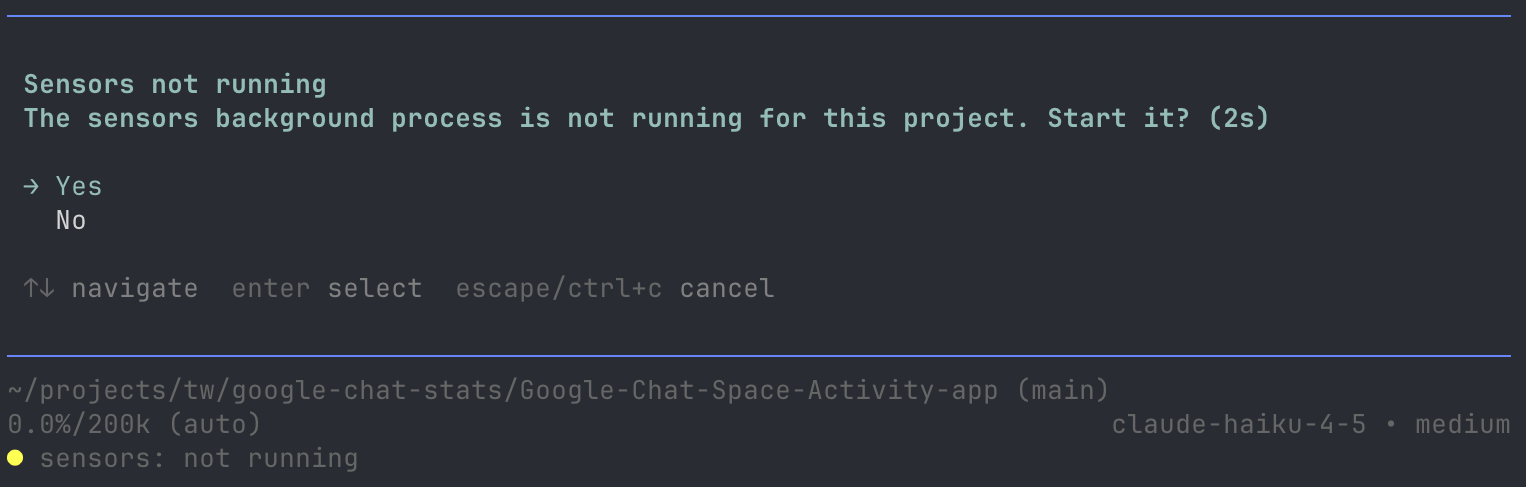
Figure 9: Custom extension in Pi, asking the user if they want to run the sensors on startup, and showing sensors state in the status line.
Adding a sensor
Every time I added a new sensor, I had to write a little parser that could get the results from whatever output a sensor provided (e.g., reading coverage-final.json, or the semgrep output). This became quite easy once I created a skill for it, but it does require changing the CLI's code every single time.
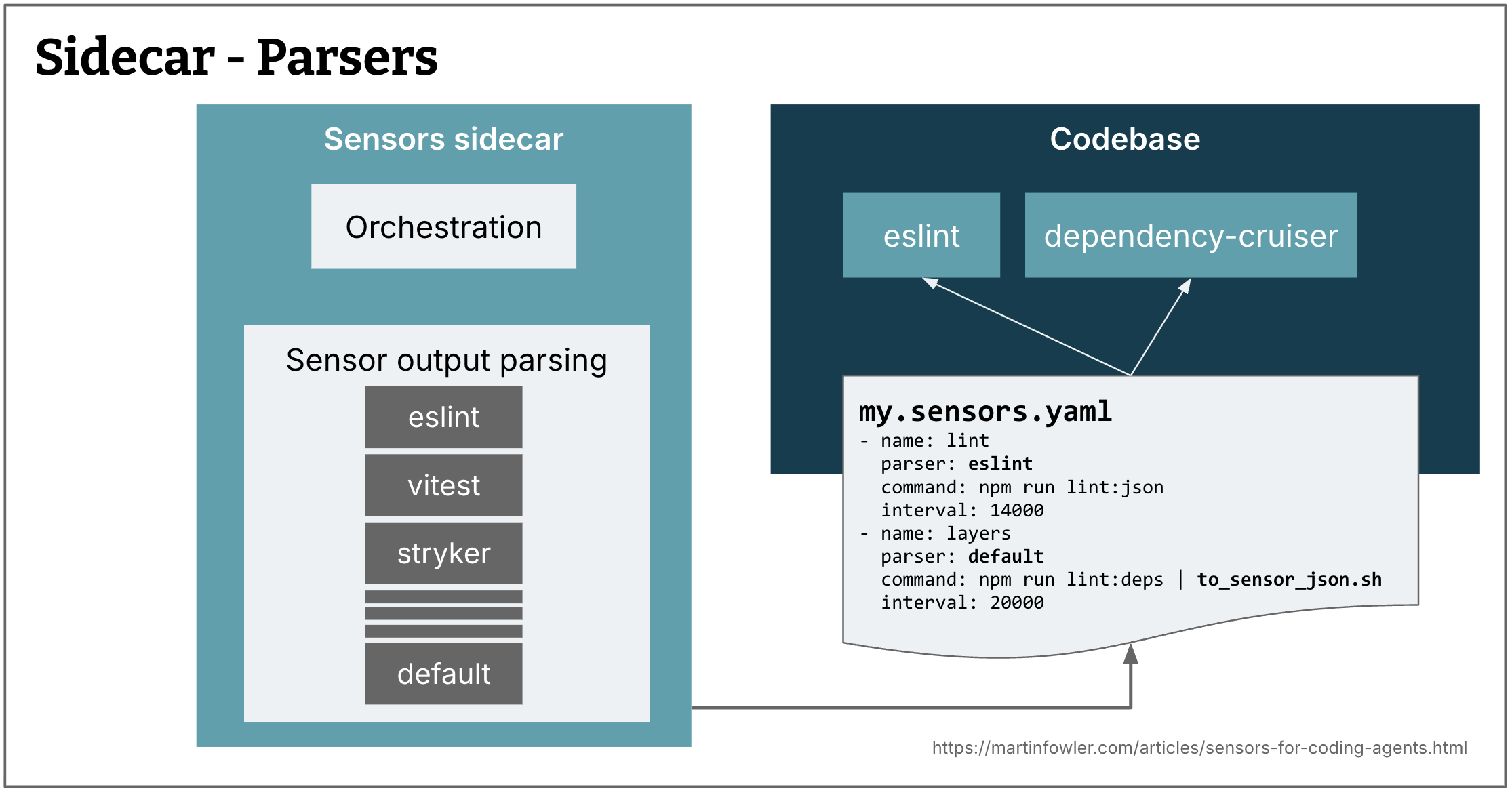
Figure 10: A tool like this needs to know how to parse each sensor's outcomes
So I started moving to a default parser that expects a certain JSON schema as output from the schema. In this approach, instead of having the CLI run e.g. ruff directly, it would run python ./ruff_sensor.py -- check sensors/, where ruff_sensor.py would run ruff, and then turn its output into the JSON schema the CLI understands and can display.
This is an example of how the decision-making for customisation of CLIs like this might change. In the past, building a plugin system for the most common sensor types would be an obvious decision. But now, for some things we can expect users to build a bit of that customisation for themselves, to keep the tool itself simpler.
Performance
Naturally, the more of these sensors we want to run, the more resources they are going to need. The difference in performance of build and dev tools across different tech stacks can be quite significant. Yet another thing that is good for agents as well as humans: fast and efficient build tools providing quick feedback loops are very important. I used this setup for a few Typescript codebases, as well as a Python application. And you might have guessed it, the Python setup (where many of the tools these days are “blazingly fast” Rust implementations) didn't give me any trouble at all. Running the sensors for a Typescript codebase on the other hand regularly started my M3's fan. But hold your Javascript prejudices - this was actually in part the result of my virus scanner kicking into overdrive, because those sensors were rewriting files all the time...
Effectiveness
One of the frequently asked questions about harnesses and harness engineering is how to know if the setup is effective. In the context of sensors, this question is similar to that of “How effective are our CD pipelines?”. If they're always green, that's suspicious, because they never catch anything. If they're always red, that either means that we're really bad at producing code that is up to our standards, or that the pipeline is way too sensitive or flaky.
But even though this is an “it depends” question, we need data to answer it. So I started logging a history of sensor states every time they were checked, to get some data.
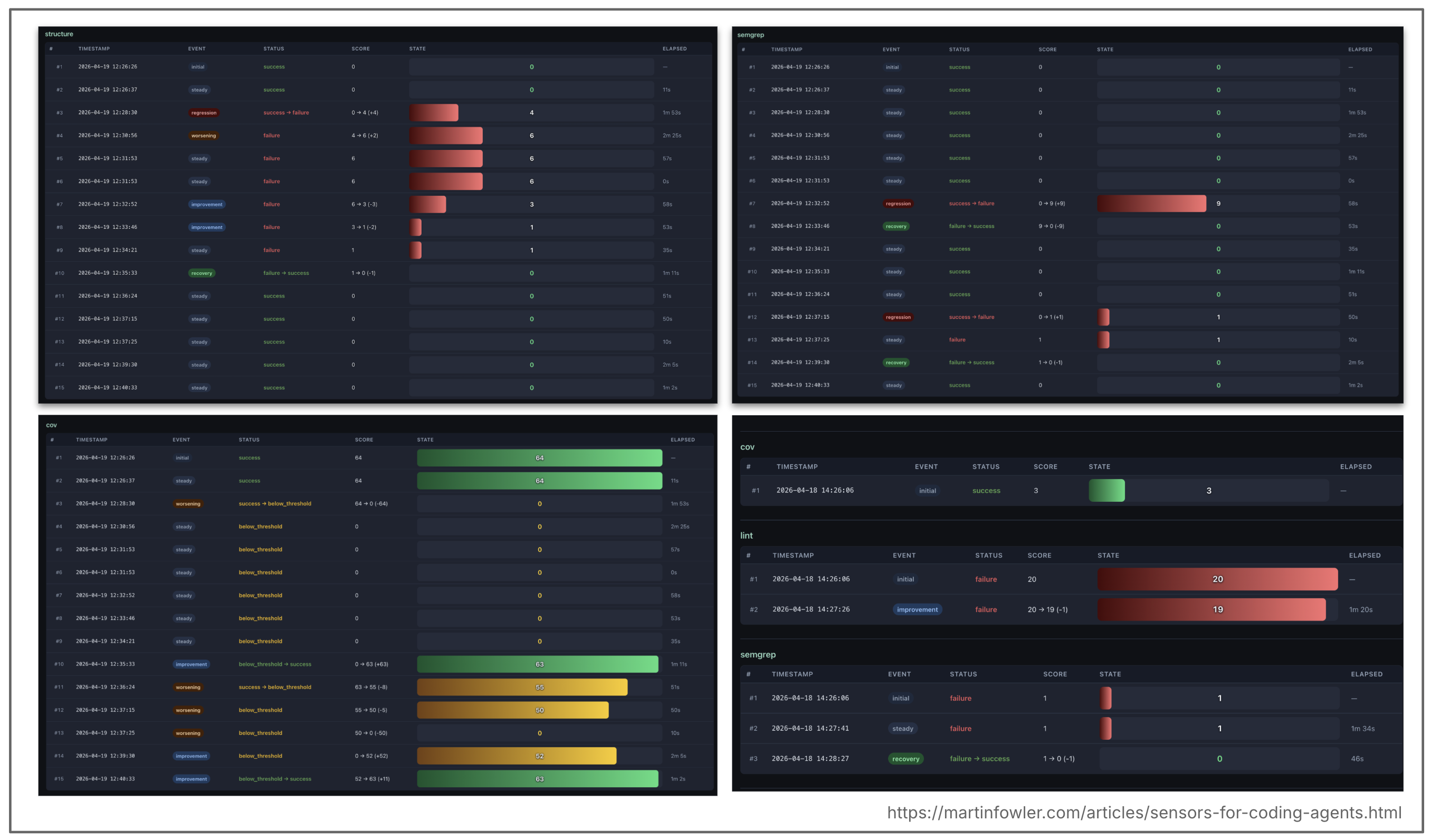
Figure 11: History of sensor states
This historical data could answer questions like these:
- Is there a trend in sensors failing less frequently? --> a signal that the guides or the models are improving
- Which sensors are never failing? --> a signal that they are not necessary
- What sensors / rules are frequently failing? --> a signal that we could improve our guides there
Conclusions
I have found this setup very convenient both as a head up display for myself in supervised coding sessions, and as a source of information for my agent.
The biggest gaps as of now are:
- If I wanted to effectively use the CLI in unsupervised sessions, I would have to invest more thinking into the harness integration, i.e. how to make sure that the agent actually calls the CLI before it wraps up its work.
- I haven't spent effort yet on making the CLI available to a coding agent sandbox, probably by putting it into a registry. “Sandboxability” should be a prime concern for all tooling around coding harnesses, to reduce the number of inconveniences and excuses developers have for not using sandboxes.
Significant Revisions
27 May 2026: published test suite as regression sensor and conclusion
20 May 2026: Published: dependency rules, coupling data, and AI modularity review
19 May 2026: Published basic linting