
Draft
This article is a draft.
Please do not share or link to this URL until I remove this notice
Local models for coding - as of June 2026

This article is part of “Exploring Gen AI”. A series capturing Thoughtworks technologists' explorations of using gen ai technology for software development.
16 June 2026
Until recently I hadn't tried running models locally for quite a while, the disappointment had just always been too high when I did it. About a month ago though, I dove back in - there were just too many claims out there to ignore, about how far they have come, how it's now much more feasible to run them, and how some of them have become really good at coding. So this is my personal experience with using them, on and off, over the past 4 weeks or so.
Scope
My main interest is how useful they are for coding, and not just auto complete, but agentic coding. Secondly, I'm interested in how ready and usable they are more broadly, for developers who don't want to dive into a bunch of specs and extra tooling and tweaks to make it work.
This is not a rigorous and structured comparison approach, where I set up some tasks and ran them as evals against multiple models. It's an experience report of trying to use the models in supervised agentic coding sessions.
In terms of hardware, I have been running models on these two machines:
- Apple M3 Max, 48GB RAM
- Apple M5 Pro, 64GB RAM
Step by step
Evaluating small models in this way is quite tedious: downloading takes a while (on my non-fibre internet connection in the middle of Berlin), then configuring the new model in a harness, using if for tasks, interpreting the results, ...
I thought of it as working through a funnel of increasing viability:
- Does it fit into the RAM? If I don't have enough RAM, I won't even be able to run the model, period. For the general assessment of broader viability, let's assume as a baseline of 48GB available RAM.
- Does it run at reasonable speed? Once a model is running, the first smoke test is to see how quickly it can respond to a simple request.
- Can it handle tool calling? Once I saw that the request speed was bearable, I gave it a simple task from a coding harness that involved reading and changing files, to see if it can handle the tool calling.
- Can it handle a continued conversation / more context? Once a simple task worked, I continued the conversation for longer, to see how much back and forth it could take in terms of length of the context.
- Can it handle a larger or more complex task? If a setup survives 1-4, the next level is to give it a more complex task to solve and see what happens.
Factors that influence viability
There are a myriad of factors at play that can influence the results, which makes it quite a tedious undertaking to evaluate which setup works best under the resource constraints we have. It also makes it very hard to filter the signals from the noise when people share their successes with these models online.
Hardware
RAM
The model weights must fit into the available RAM, or more specifically, VRAM. If they don't, the runtime either crashes (happened to me once!) or drops to unusably slow speeds. On Apple Silicon, virtually all RAM is accessible to the GPU with no separate VRAM limit, this can be different in other machine configurations.
Impacts: Model runnability; Speed of responses
My experience: On the machine with 48GB, I ran models between 8 and almost 30GB. The 30GB stretches it a lot of course, especially when the context window gets added, the 15-25GB size is more comfortable and I don't have to close quite as many other applications. On the machine with 64GB, I once ran a model that was 48GB big - which went great at first, but then it quickly crashed...
Processing power
More cores generally means faster token generation, but architecture matters too, and newer chip generations can close the gap even with fewer cores. This is a tough one to compare between machines without diving much deeper into the details of each configuration and architecture.
Impacts: Speed of responses
My experience: On both the M3 Max and the M5 Pro, all models I ran had quite an impressive speed, compared to where they were a year ago. I could see myself using them happily at that speed - if the quality of the output were acceptable.
Memory bandwidth
Memory bandwidth is a bottleneck for token generation, determining how fast data moves between RAM and the compute units.
Impacts: Speed of responses
My experience: Both the M3 Max and the M5 Pro I used have a nearly identical bandwidth of ~300 GB/s, so I don't really have a comparison to something else. But as mentioned before, the speed of all models I tried was quite acceptable.
Model
Number of parameters
The parameter count basically represents the size of a model's learned knowledge and capabilities. More parameters generally mean better output quality, but also a larger file size.
Impacts: Amount of RAM needed; Quality of results
My experience: With 48GB, I used models around 30B parameters, +/- 5B. The biggest model I loaded on the 64GB machine was Qwen3 Coder Next 80B (MoE), which solved the task I gave it a lot better than the smaller models - but then crashed after I continued the conversation.
Reasoning capabilities
Reasoning models go through a “chain of thought” process before responding, which helps with complex multi-step tasks, but can also generate significantly more tokens and slow responses down.
Impacts: Complexity of the tasks; Speed of response; Context window size (and therefore need for RAM)
My experience: All of the models I tried had reasoning capabilities, so I haven't got a comparison how well they perform with or without reasoning. However, I often noticed them going in endless circles inside of the reasoning chain, especially the smaller ones. (“Wait, ...”, “Actually, ...”, “But wait, ...”) So I've been meaning to see what would happen with reasoning off...
Tool calling capabilities
For agentic use, a model must be able to reliably emit structured tool call syntax that matches the schema the harness expects. Models that weren't specifically trained or fine-tuned for tool calling often produce malformed calls.
Impacts: Ability to use agentic harnesses
My experience: This was a common issue with the models I tried, though they
could often self-correct and recover from a failed tool call (e.g. using wrong parameter
names like file.path instead of filePath).
Format
GGUF is the standard format for llama.cpp-based runtimes like LM Studio and Ollama, and has by far the largest model library. MLX is Apple's own framework built specifically for Apple Silicon and can be faster, but fewer MLX-formatted models are available at the moment.
Impacts: Speed of responses
My experience: I tried both formats for one or two of the models, but I personally didn't feel much of a difference. That could be due to the unstructured type of evaluation I did - on the other hand, as any user experience researcher would tell us, the perceived speed is ultimately what matters, not what the clock says...
Quantization
Quantization compresses model weights to reduce the file size, trading some quality for a much smaller RAM footprint. The level of quantization is usually marked in model names and descriptions as Q4 / Q6 / Q8, or 4BIT / 6BIT / 8BIT, with lower numbers meaning higher compression. The newest buzz recently have been QAT (Quantization-Aware Training) variants of models, which are trained with quantization simulated during the training. They are supposed to preserve quality better than standard quantization.
Impacts: Amount of RAM needed; Speed of responses; Quality of responses
My experience: All of the models I downloaded were at Q4 / 4BIT, I didn't get around to trying different variations yet. I also haven't gotten around to trying a QAT one.
Architecture
MoE (Mixture of Experts) models have a large total parameter count but only activate a subsection of their weights at inference time, so a 35B MoE model needs significantly less RAM and can run faster than a 35B dense model.
Impacts: Amount of RAM needed; Speed of responses
My experience: TODO (and ask Bharani)
Context window size setting
Context window size consumes RAM on top of model weights through the KV cache, which grows with context length. The default size configured in the runtimes is far too small for agentic coding, it has to be set to at least 32K, if not 64K.
Impacts: Size and complexity of tasks; Amount of RAM needed; Speed of responses; Ability to use reasoning
My experience: I tried to see how little I could get away with. For small tasks I could sometimes work with 32K, but often I had to increase to 64K, so that seems to be a good default minimum. As the models themselves were already pushing the boundaries of my available RAM, I'm not sure how how much more I could still increase it, even on the 64GB machine... So while many of these models in theory support a larger window, actually using it is limited by the memory constraints.
List of models used
The buzz for coding has been all around Qwen3 and Gemma 4, so those were the ones I went for.
Qwen3
- Qwen3.6 35B-A3B MoE Q4 GGUF (22 GB)
- Qwen3.6 Coder Next 80B MoE GGUF (45 GB)
Gemma 4
- Gemma 4 12B Q4 GGUF (7.5 GB)
- Gemma 4 26B 4BIT MLX (15.6 GB)
- Gemma 4 31B 4BIT MLX (29 GB)
Runtime (LM Studio, Ollama, ...)
The runtime handles model discovery, configuration, and loading. It also determines the
practical question of how we integrate our harness with the model. Usually this happens by
starting a web server that provides a range of typical APIs that the harnesses support,
and the localhost URL of that web server is then configured as a model
provider in the harness. Most widely supported by harnesses is the OpenAI API, but Claude
Code e.g. expects Anthropic's
Claude API .
Impacts: Ease of configuration and discoverability; ease of integration with harnesses; speed of responses
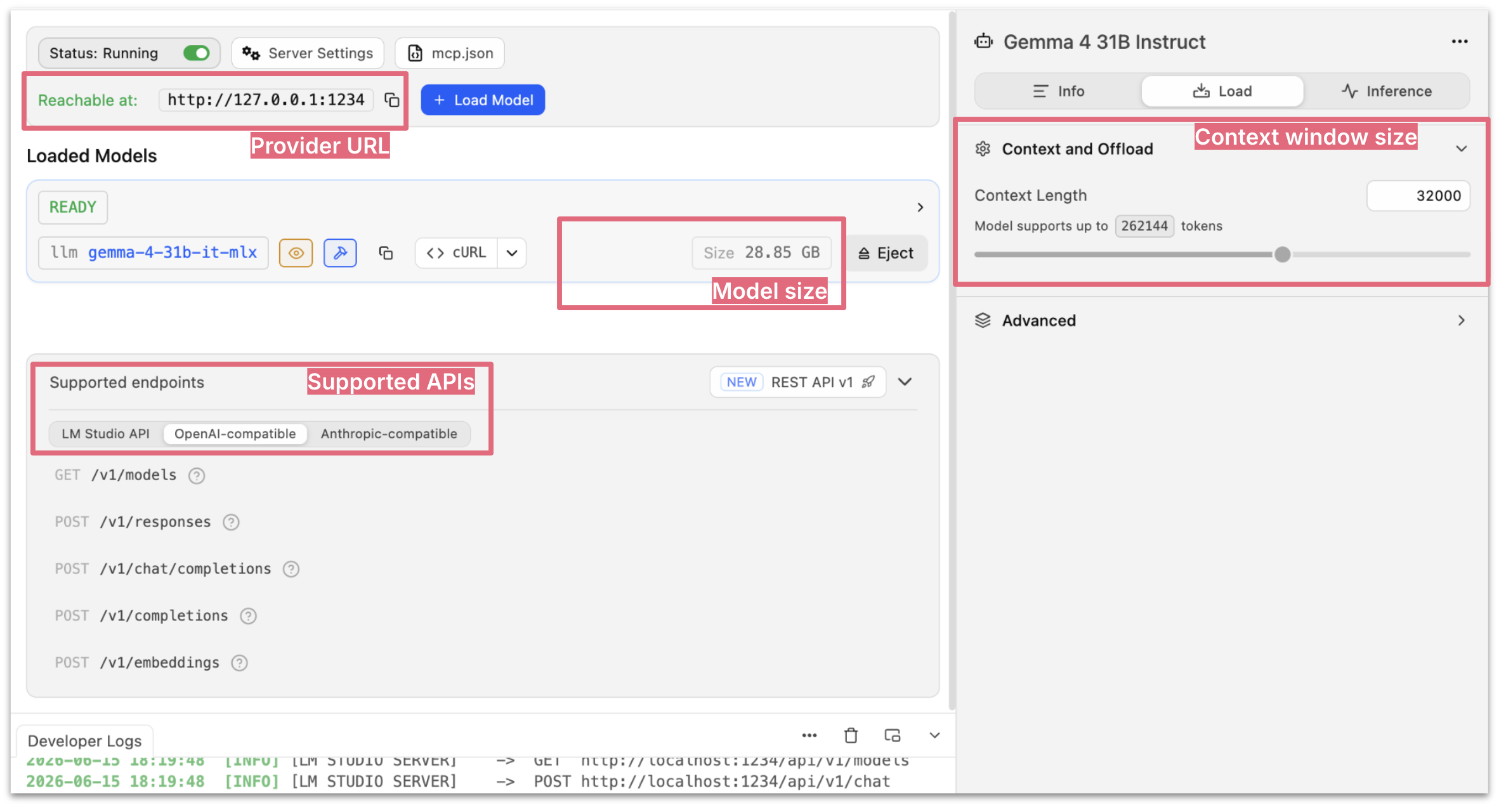
Figure 1: The “Developer” view in LM Studio, showing a running server and many of the factors described so far (provider url, model size, APIs, context window size configuration)
My experience: While I have used other runtimes in the past, I am currently back using LM Studio, purely for its user experience. I'm sure there are corners of the internet where folks discuss the ins and outs of which runtime is the most optimised for which hardware and what type of models. But thinking back to the broader viability of running local models, user experience plays a huge role for that.
Harness (Claude Code, OpenCode, Pi, ...)
Coding harnesses can vary significantly in how much overhead they inject into the context window (system prompt, number of tools), which becomes more of a problem locally where we're so resource constrained. Our own expanded harness around that also makes a difference, e.g. how many skills or MCP servers are active. A description of each of them will be sent to the model, and again, take up space in the context window.
I mentioned above that small models still struggle with tool calling - and it probably doesn't help that each harness has slightly different schemas for the basic tools. Let's take editing a file as an example:
- Pi:
old_textandnew_text(see here) - OpenCode:
oldStringandnewString(see here) - Claude Code:
old_stringandnew_string(at least that's what it says when I asked it)
Finally, not all harnesses easily support the integration of local models. Open source tools are usually the go-to, but Claude Code can also be pointed at local providers. GitHub Copilot seems to support it for their CLI, and I think it's possible in Cursor as well to override the OpenAI base URL and point it to localhost.
Impacts: Size of context window needed; Tool calling success; Integratability
My experience: In my attempts, I used OpenCode and Pi. I avoided Claude Code as it apparently would burden the context window quite a bit.
Tasks I tried
The choice of task is ultimately one of the biggest factors that determine viability of small, locally run models - it's all about expectations. It's about complexity of the task (How good is the model at reasoning?), about the number of files we estimate the agent will have to read and write (How good is the model at tool calling? How big is the context window?)
The task type matters enormously -- a single-file script is far more forgiving than a multi-file refactor that requires code research across a large codebase. Tech stack also plays a role: JavaScript files caused significantly more failures in my experiments than equivalent Python tasks, particularly once files got long enough that edits started filling the context window.
Impacts: Context window pressure; Whether the model can complete the task at all; Quality of outputs
Changing a bar chart
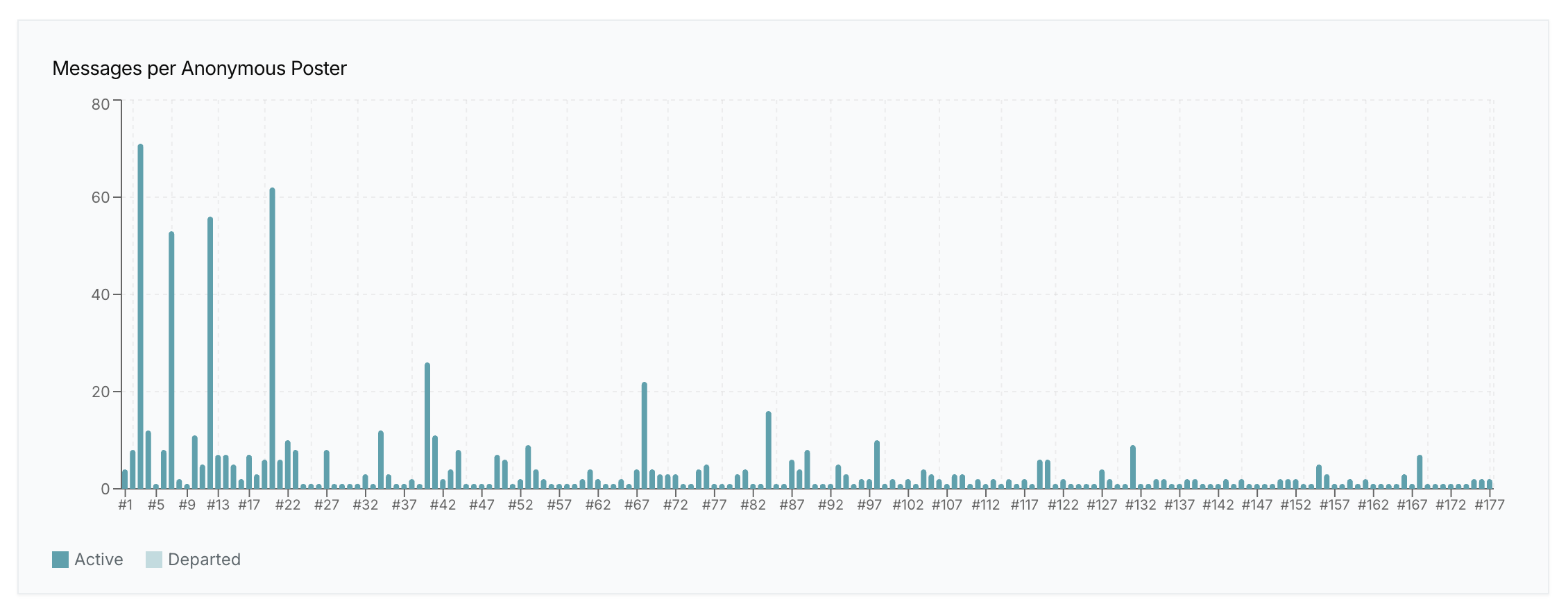
Figure 2: The bar chart to change, current state
I had this bar chart in an application showing analytics for chat space activity, and there were multiple things wrong with it. I'll describe them by giving you the prompt I gave the locally run models:
Note how I'm referencing the exact current title of the chart, which gives a very clear hint how to find the right place in the code to start. So this requires some code search, but I've made it very easy for the agent.
The result should look something like this:
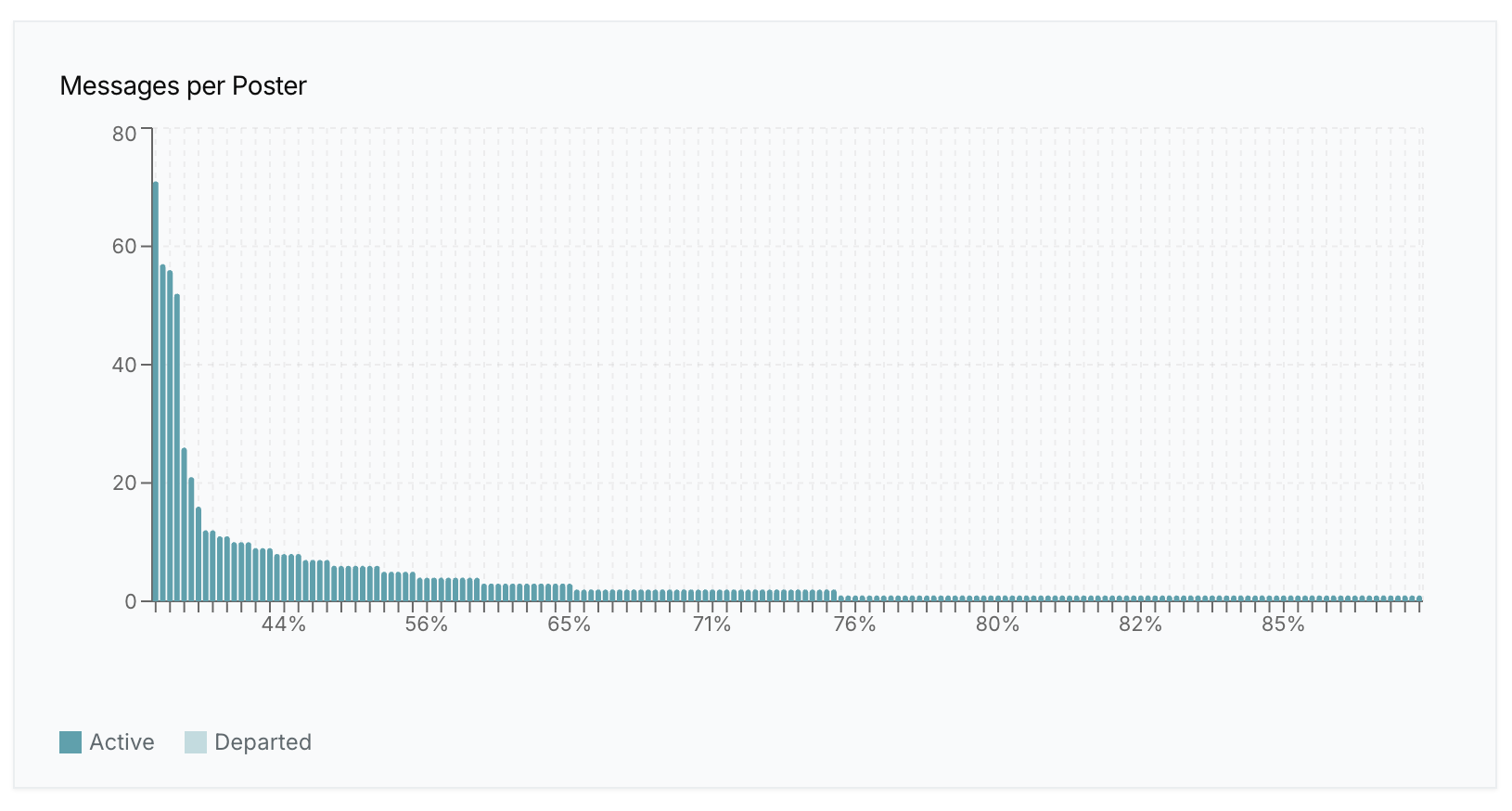
Figure 3: The bar chart to change, wanted state
I tried this with Qwen3.6 35B, Gemma 4 31B, Gemma 4 26B and Qwen Coder Next 80B MoE, with both OpenCode and Pi as the harnesses.
- Speed: Cursor's
composer2, one of the fastest capable models I've used so far, builds this (functionally correct) in about 1 minute. All of the listed small models' first generation run took about 2.5 minutes. Which I don't think is that bad for this type of task (though we're used to different) - Outcomes:
- Qwen Coder Next did succeed in a functionally correct implementation of this within those 2.5 minutes on my 64GB M5 Pro. However, when I added another message to the conversation after that, the runtime crashed - so it's capable, but not realistically runnable.
- Qwen3.6 35B and Gemma 4 31B adjusted the sorting without issue, but then it took me 15 minutes to go back and forth with them about the cumulative percentages until that functionality worked. In the spirit of my “funnel” described in the beginning, at this stage I just wanted to focus on functionality, and didn't even look at the quality of the code - if the models cannot even give me functionality right, the quality doesn't matter much yet.
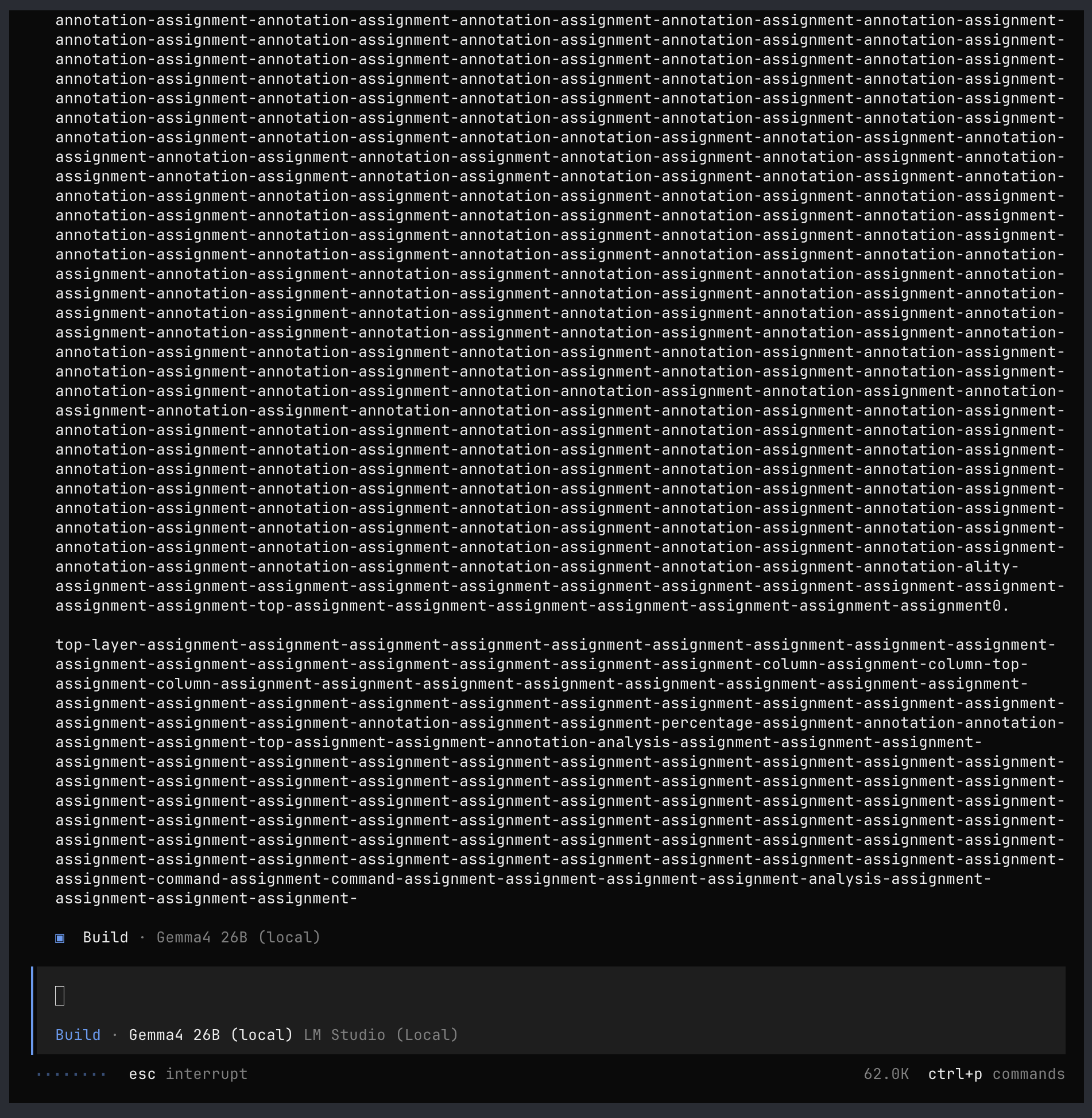
- Gemma 4 26B was the most successful here. It did implement the full set of things I asked for. But then when I continued the conversation to ask for a refactoring, I got the “text wall of doom”...
Writing a small script
I wanted to write a script to resolve the countries behind access_log entry IP addresses. I had done some research and preparation already, so I could be very specific in my prompt:
Note that I also started by asking for a simple first step, with the goal to iterate on it further.
This task worked very well with both Gemma 4 26B and 31B.
Add a chart
After I had all the country data, I wanted to add a chart to an existing access log data visualisation page. That page was generated by a Javascript file that had about 450 lines of code at the time, and I wanted the agent to add to it.
I tried this with Gemma 4 31B and Qwen 35B, and it was surprisingly rough! I felt like these weren't the same models I had used before, for the other tasks. I saw my memory usage increase quite a bit, very long reasoning chains followed by excruciatingly slow attempts to finally edit the file. I tried some different variations, like refactoring into smaller files with a big model first. I tried with both OpenCode and Pi, but it did not make much of a difference. My notes say things like, “Gave up after 11 minutes”, “Gave up after 12 minutes”, “Stopped after 8 minutes”. No idea what was different here compared to the other tasks.
As this task required change to exactly one standalone file, I also tried to go old school here: I started a plain chat with a model in LM Studio, without any harness use, and pasted the full file in there - that gave me a working solution! However, the whole thing took about 6 minutes, and most of that time was spent by the model regurgitating my 450 lines of previous code, plus the added lines for the chart.
Create a new data entry
For my personal website, I have a small static site generator that generates one big index page listing all my content. Each of the pieces of content is defined in markdown frontmatter. I have a skill that takes a new publication link (e.g. to a new podcast episode) and drafts a new markdown file for me, including reading the contents of the link, looking if there's a new teaser image already, assigning it an appropriate category. Very straightforward, relatively simple task, that requires some basic tool usage (reading a website, writing a file)
I did this with Qwen 35B, and it worked like a charm.
Task characteristics
So as you can see from these adventures, using small models for agentic coding is quite a roller coaster ride at the moment! These are some of my reflections on the choice of task, as of now:
- Will it require code research, or can the prompt point at the specific files to change? The more discovery the agent has to do, the more it requires tool calling, and the more it fills up the context window, and therefore precious RAM.
- How many files might it have to edit? Even if we can point the agent at specific files and skip some of the code search, the bigger these files are, the more pressure on the context window.
- How specific are the instructions? We've all become used to being a lot more vague with our coding agent instructions, as the big models have gotten so capable. Prompting agents with local models feels a bit like a mix of the early auto complete days, and my first attempts at using Copilot's “multi-file edit” mode in November 2024...
- What is the tech stack? It's hard to tell from this very small data set, but my impression was that I was usually much more successful with the Bash and Python tasks than the JavaScript ones.
To sum up...
Figure 5: The many factors that can impact the results - tap or hover over boxes to highlight arrows.
- Runnability: RAM is the core constraint. I used models between 15-25GB, context windows of maximum 64K, harnesses OpenCode and Pi with zero Skills and MCP servers active)
- Response speed: Is impacted by many factors, but was usually quite good for me - LM Studio + 4BIT quantization + M3 Max/M5 Pro + GGUF/MLX both
- Viability for agentic coding: Tool calling was tricky still, the models often failed, but can sometimes self-recover from their failures. This is a key component of agentic coding specifically. Without it, you can still go the old-fashioned way of copying and pasting from a chat window of course. And small models are definitely a lot more viable for auto complete than agentic use.
- Quality of outcomes: Definitely works better for small, well-defined tasks, obviously nowhere near the type of capability we can get from the big models. Overall it was very hit and miss for me.
latest article (Mar 04):